This post discuss about how to read the data that your browser stores locally. This data includes cookies, forms, history, boookmarks, etc which can be used to obtain lots of information. In this post we will focus on firefox in Linux platform but the methodology will be same for all.
Browsers require their own database and set of data to function. Various file formats are used by browsers like .sqlite, .json, .txt , etc to hold various information.
The profile folder location is different for different browsers. For E.G.
| Firefox in Linux | Firefox in Windows |
|---|---|
| /home/$USER/.mozilla/firefox/{PROFILE} | C:\Users\%USERNAME%{PROFILE} |
| Chrome in Linux | Chrome in Windows |
| /home/$USER/.config/google-chrome/Default | C:\Users\%USERNAME%\AppData\Local\ Google\Chrome\User Data\Default\ |
Note that when the browser is running, some of the database files will be in locked state. You have to either kill the browser or copy the files to a separate folder to make them readable.
Now let us first learn about the files in profile folder
| FILENAME | PURPOSE | CAN BE UTILISED |
|---|---|---|
| extensions | Stores the files required for extensions | to gather list of installed Extensions |
| cert9.db | Sstores security certificate settings and SSL certificates imported into Firefox | View and get installed custom Certificates |
| formhistory.sqlite | stores the autocomplete history from web Forms and search bars | ther autocomplete data |
| persdict | stores custom words added to Firefox’s Dictionary | extra information about local Lang |
| permission.sqlite | Permissions assigned to website | Check permission level |
| places.sqlite | history of visited sites | Get browser history |
We will now use our Ruby language to parse the interesting data from these files. Save the below code to a FILENAME.rb format
require 'sqlite3'
require 'terminal-table'
require 'json'

path = './'

@extensions = path + 'extensions.json'
@cert = path + 'cert9.db'
@formhistory = path + 'formhistory.sqlite'
@persdict = path + 'persdict.dat'
@visitedsites = path + 'places.sqlite'
@cookies = path + 'cookies.sqlite'
@permfile = path + 'permissions.sqlite'

def formhistory
db = SQLite3::Database.new @formhistory
a=db.execute  "SELECT fieldname, value FROM moz_formhistory"
table = Terminal::Table.new :rows => a
puts "****************FORM HISTORY****************"
puts table
puts ''
end

def extension
#Installed extensions
a=JSON.parse(File.read(@extensions))
puts "****************INSTALLED EXTENSIONS****************"
a['addons'].each{|x| p x['defaultLocale']['name']}
puts ''
end

def certificates
db = SQLite3::Database.new @cert
puts "****************INSTALLED CERTIFICATES****************"
a= db.execute  "SELECT * FROM nssPublic"
a.each{|x| p x[4]}
puts ''
end

def persdictionary
puts "****************CUSTOM DICTIONARY WORDS ADDED****************"
puts File.read @persdict
puts ''
end

def historyAndBookmarks
db = SQLite3::Database.new @visitedsites
urls=db.execute "SELECT title FROM moz_places"
puts "****************VISITED WEBSITES****************"
puts urls
puts ''
puts "****************BOOKMARKS****************"
bm=db.execute "SELECT title FROM moz_bookmarks"
puts bm
end

def permission
db = SQLite3::Database.new @permfile
a=db.execute  "SELECT origin,type FROM moz_perms"
a.each {|x,y| print x + " is allowed " + y; puts ''}
end

def cookies
db = SQLite3::Database.new @cookies
a=db.execute  "SELECT name, host, path, value FROM moz_cookies"
table = Terminal::Table.new :rows => a
puts "****************VISITED WEBSITES****************"
puts table
puts ''
end

=begin
Uncomment the lines below one by one to see data. Uncommenting all
will give you lots of data in one go
=end

#cookies
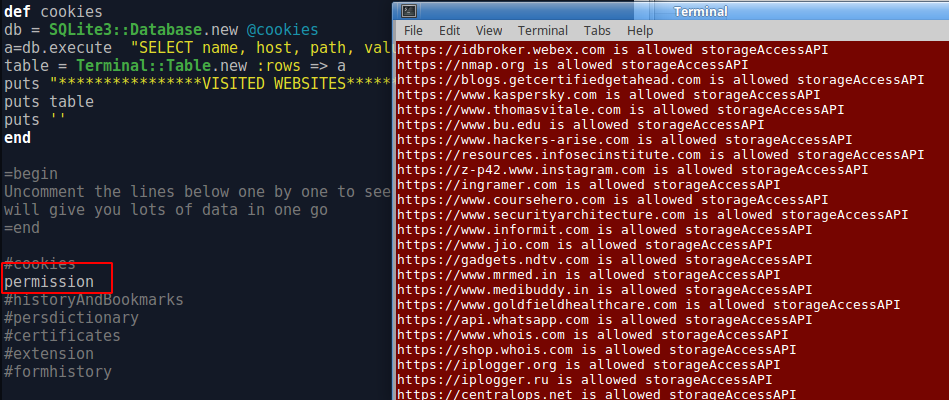
permission
#historyAndBookmarks
#persdictionary
#certificates
#extension
#formhistory
CODE ANALYSIS
The code is quite simple. It uses sqlite3 and json libraries to read the data from the files. The terminal-table library is used to print the output in a table format
- The line in format SQLite3::Database.new @cookies are used to read the database files
- The lines in format db.execute “SELECT name, host, path, value FROM moz_cookies” are used to execute the database query to print column values from defined tables
EXECUTE
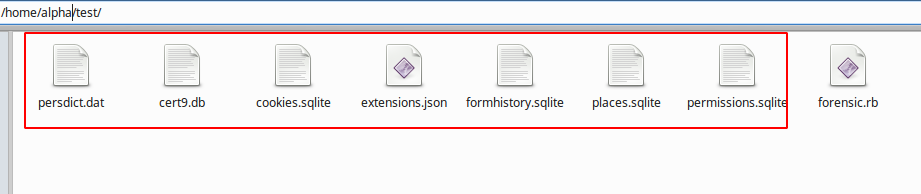
Copy the mentioned files from profile folder and put it in same folder where you saved your script. you can also set the path variable if files are in different location
The last lines of the script are commented to avoid large output. SImply uncomment the line of whose output you want. In our case we are executing permission method of whose output is shown in right side terminal window