
Obfuscation can be simply understood as the art of hiding code in plainsight, in order to defeat the signature based defence mechanisms in place.
Obfuscation has always been in fashion among malware authors. These obfuscation techniques can be frequently observed while researching advanced threats and malware samples.
This blog posts will highlight some of the command line obfuscation techniques that have been heavily used by the threat actors. A special thanks to the Fireeye team for sharing this knowledge with the community.
The post is highly intended and shared to help blue teams secure their defense mechanisms.
String Replacement
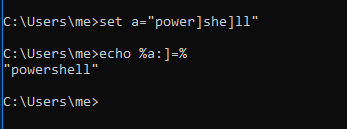
This technique includes replacing the characters from a string. Consider below example
set string=hello! set string=%string:!=%
The string will now have the value “hello” instead of “hello!”
Using Double Quotes
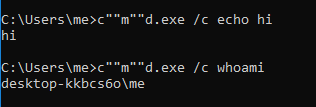
Double quotes can be used in command as well as command arguements. Using a balanced pair of double quotes do not affect the syntax. For ex: c”“m”“d.exe /c not”“e”“pad is a perfectly balanced command which works
###
Extracting Value From Variables
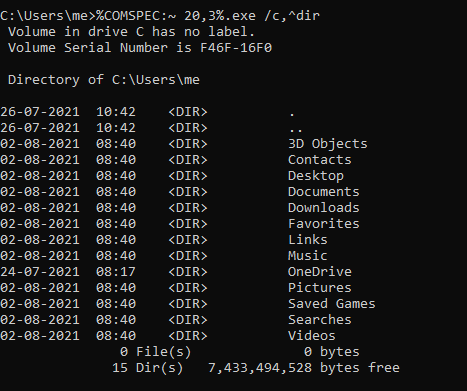
COMPSEC is an environment variable which holds the default shell in windows. You can check it via set command. The string ‘cmd’ can be extracted from this variable to avoid typing it in our script and avoid detection. In below image %COMSPEC:~ 20,3% evaluated to cmd
Using Parenthesis
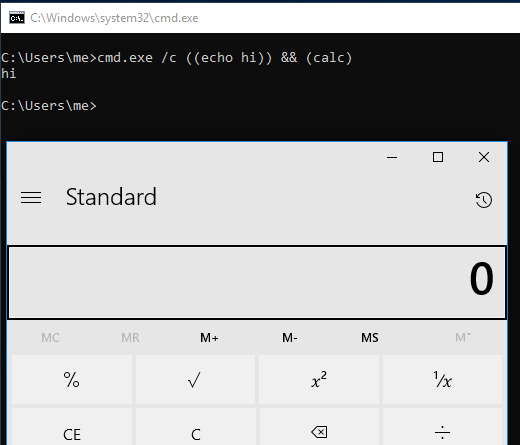
Parenthesis can be used in command line arguments for obfuscation purposes as shown in below image
Using Caret For Obfuscation
Most commonly used obfuscation character. The ^ symbol (also called caret or circumflex) is an escape character in Batch script. When it is used, the next character is interpreted as an ordinary character. Caret character can escape itself.
echo ^alpha   will give      alpha
echo ^^alpha will give    ^alpha
echo ^^^^alpha will give    ^^alpha
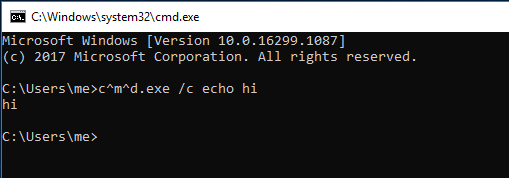
###
For Loop Obfuscation
Cmd’s native tokens and delim make it possible to extract values from a string and use accordingly. Delimiter acts like -d and tokens act like -f of cut command in linux. In image below we are extracting the word ‘powershell’ from environment variable.

###
Comma and Semicolon Obfuscation
Comma and semicolons can be used in place of spaces under cmd.
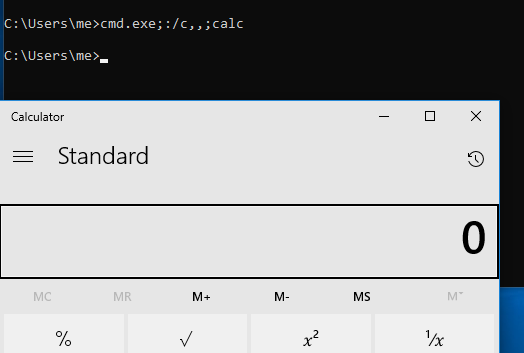
Let us now combine some methods to download remote contents. For this we created a local server on port 8000 and hosted a file with below contents:
Write-Host This is fetched from remote server -ForegroundColor Green; Start-Process -FilePath "notepad.exe"
The command executed successfully popping up a notepad, as shown in below image

FOR ENTHUSIAST READERS
Try to decode the below obfuscation:
